Viewing CEV details for Amazon RDS Custom for Oracle
Note
End of support notice: On March 31, 2027, AWS will end support for Amazon RDS Custom for Oracle. After March 31, 2027, you will no longer be able to access the RDS Custom for Oracle console or RDS Custom for Oracle resources. For more information, see RDS Custom for Oracle end of support.
You can view details about your CEV manifest and the command used to create your CEV by using the AWS Management Console or the AWS CLI.
To view CEV details
Sign in to the AWS Management Console and open the Amazon RDS console at https://eusc-de-east-1.console.amazonaws-eusc.eu/rds/
. -
In the navigation pane, choose Custom engine versions.
The Custom engine versions page shows all CEVs that currently exist. If you haven't created any CEVs, the page is empty.
-
Choose the name of the CEV that you want to view.
-
Choose Configuration to view the installation parameters specified in your manifest.

-
Choose Manifest to view the installation parameters specified in the
--manifestoption of thecreate-custom-db-engine-versioncommand. You can copy this text, replace values as needed, and use them in a new command.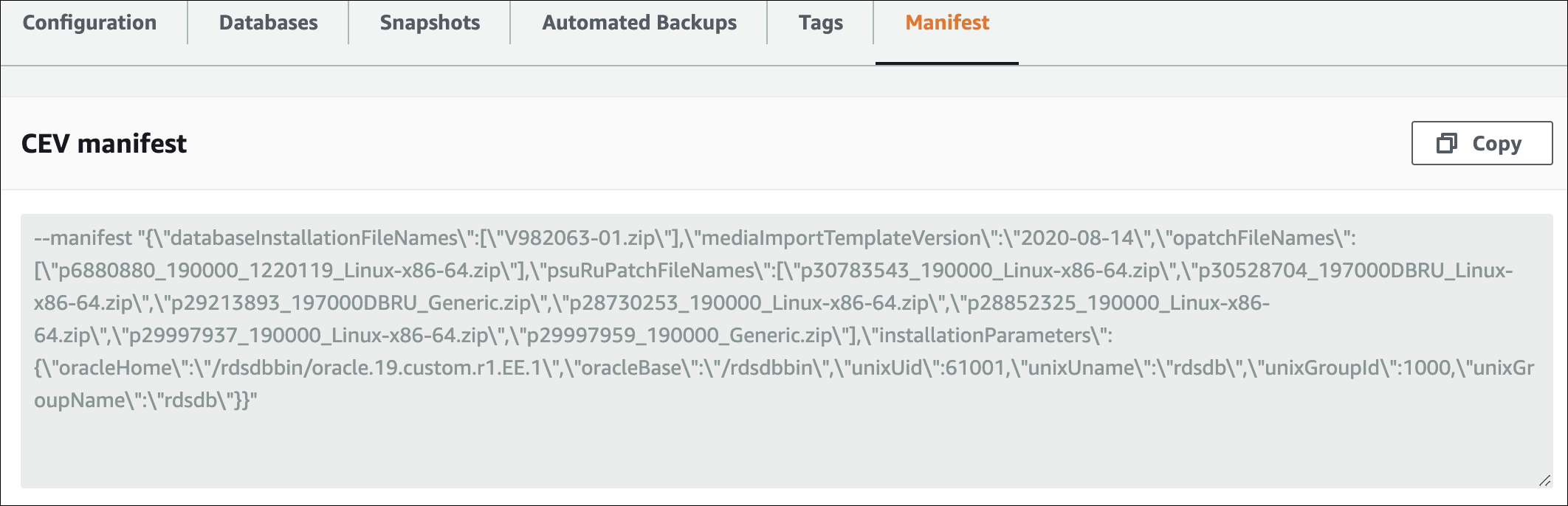
To view details about a CEV by using the AWS CLI, run the describe-db-engine-versions command.
The following options are required:
-
--engine, whereengine-typeengine-typeiscustom-oracle-ee,custom-oracle-se2,custom-oracle-ee-cdb, orcustom-oracle-se2-cdb -
--engine-versionmajor-engine-version.customized_string
The following example creates a non-CDB CEV that uses Enterprise Edition. The CEV
name 19.my_cev1 starts with the major engine version number, which is
required.
Example
For Linux, macOS, or Unix:
aws rds describe-db-engine-versions \ --engine custom-oracle-ee \ --engine-version19.my_cev1
For Windows:
aws rds describe-db-engine-versions ^ --engine custom-oracle-ee ^ --engine-version19.my_cev1
The following partial sample output shows the engine, parameter groups, manifest, and other information.
"DBEngineVersions": [
    {
        "Engine": "custom-oracle-ee",
        "MajorEngineVersion": "19",
        "EngineVersion": "19.my_cev1",
        "DatabaseInstallationFilesS3BucketName": "us-east-1-123456789012-cev-customer-installation-files",
        "DatabaseInstallationFilesS3Prefix": "123456789012/cev1",
        "CustomDBEngineVersionManifest": "{\n\"mediaImportTemplateVersion\": \"2020-08-14\",\n\"databaseInstallationFileNames\": [\n\"V982063-01.zip\"\n],\n\"installationParameters\": {\n\"oracleBase\":\"/tmp\",\n\"oracleHome\":\"/tmp/Oracle\"\n},\n\"opatchFileNames\": [\n\"p6880880_190000_Linux-x86-64.zip\"\n],\n\"psuRuPatchFileNames\": [\n\"p32126828_190000_Linux-x86-64.zip\"\n],\n\"otherPatchFileNames\": [\n\"p29213893_1910000DBRU_Generic.zip\",\n\"p29782284_1910000DBRU_Generic.zip\",\n\"p28730253_190000_Linux-x86-64.zip\",\n\"p29374604_1910000DBRU_Linux-x86-64.zip\",\n\"p28852325_190000_Linux-x86-64.zip\",\n\"p29997937_190000_Linux-x86-64.zip\",\n\"p31335037_190000_Linux-x86-64.zip\",\n\"p31335142_190000_Generic.zip\"\n]\n}\n",
        "DBParameterGroupFamily": "custom-oracle-ee-19",
        "DBEngineDescription": "Oracle Database server EE for RDS Custom",
        "DBEngineVersionArn": "arn:aws:rds:us-west-2:123456789012:cev:custom-oracle-ee/19.my_cev1/0a123b45-6c78-901d-23e4-5678f901fg23",
        "DBEngineVersionDescription": "test",
        "KMSKeyId": "arn:aws:kms:us-east-1:123456789012:key/ab1c2de3-f4g5-6789-h012-h3ijk4567l89",
        "CreateTime": "2022-11-18T09:17:07.693000+00:00",
        "ValidUpgradeTarget": [
        {
            "Engine": "custom-oracle-ee",
            "EngineVersion": "19.cev.2021-01.09",
            "Description": "test",
            "AutoUpgrade": false,
            "IsMajorVersionUpgrade": false
        }
]