Viewing the billing for reserved DB instances for Amazon RDS
You can view the billing for your reserved DB instances in the Billing Dashboard in the AWS Management Console.
To view reserved DB instance billing
-
Sign in to the AWS Management Console.
-
From the account menu, choose Billing Dashboard.
-
Choose Bill Details.
-
Under AWS Service Charges, expand Relational Database Service.
-
Expand the AWS Region where your reserved DB instances are, for example US West (Oregon).
Your reserved DB instances and their hourly charges for the current month appear under Amazon Relational Database Service for
Database EngineReserved Instances.
In this example, you purchased the reserved DB instance with the All Upfront payment option, so there are no hourly charges.
-
Choose the Cost Explorer (bar graph) icon next to the Reserved Instances heading.
AWS Cost Explorer opens the Monthly EC2 running hours costs and usage report. This default report filters to Amazon EC2 usage, so you remove that filter in the next step to show your Amazon RDS reserved DB instance costs.
-
Clear the Usage Type Group filter to the right of the graph.
-
Choose the time period and time unit for which you want to examine usage costs.
The following example shows usage costs for on-demand and reserved DB instances for the year to date by month.
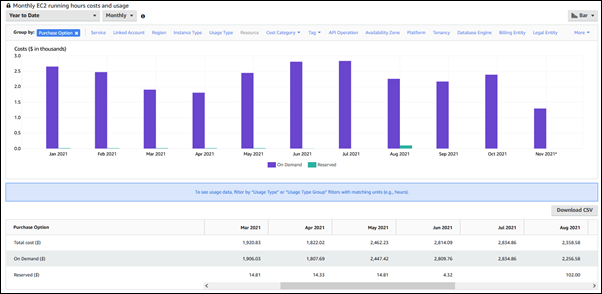
The reserved DB instance costs from January through June 2021 are monthly charges for a Partial Upfront instance, while the cost in August 2021 is a one-time charge for an All Upfront instance.
The reserved instance discount for the Partial Upfront instance expired in June 2021, but you didn't delete the DB instance. After the expiration date, AWS charged it at the on-demand rate.