Examples of policy summaries - AWS Identity and Access Management
Services or capabilities described in AWS documentation might vary by Region. To see the differences applicable to the AWS European Sovereign Cloud Region, see the AWS European Sovereign Cloud User Guide.

Examples of policy summaries

The following examples include JSON policies with their associated policy summaries, the service summaries, and the action summaries to help you understand the permissions given through a policy.

Policy 1: DenyCustomerBucket

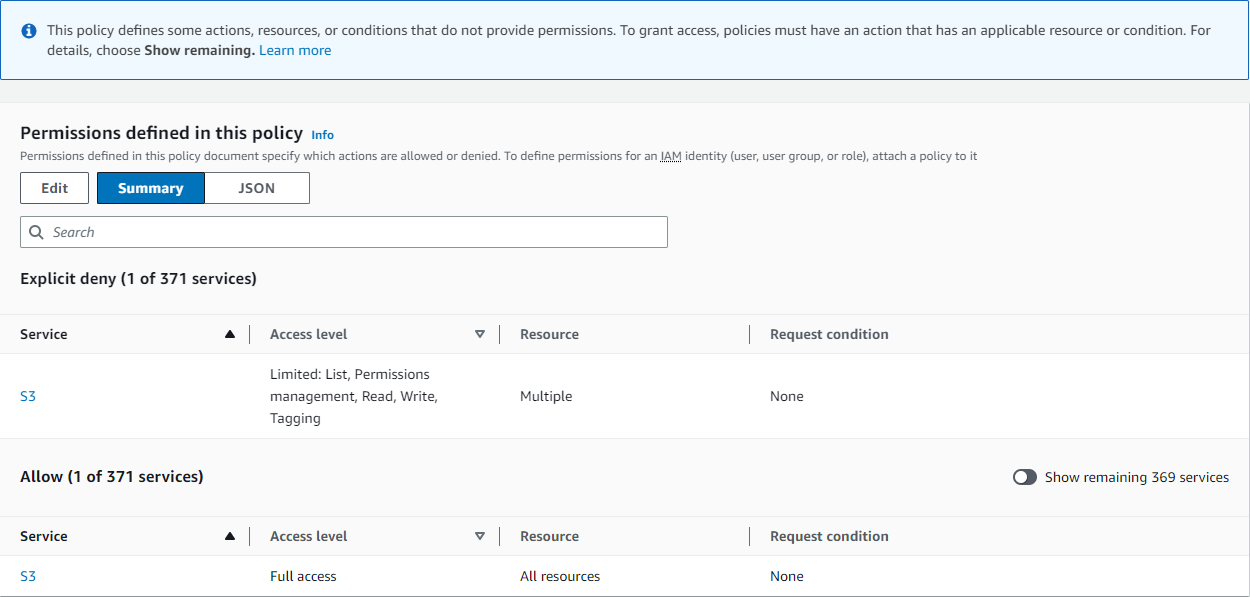
This policy demonstrates an allow and a deny for the same service.

JSON
{ "Version":"2012-10-17", "Statement": [ { "Sid": "FullAccess", "Effect": "Allow", "Action": ["s3:*"], "Resource": ["*"] }, { "Sid": "DenyCustomerBucket", "Action": ["s3:*"], "Effect": "Deny", "Resource": ["arn:aws-eusc:s3:::customer", "arn:aws-eusc:s3:::customer/*" ] } ] }

DenyCustomerBucket Policy Summary:

Policy summary for DenyCustomerBucket showing S3 service with explicit deny access level.

DenyCustomerBucket S3 (Explicit deny) Service Summary:
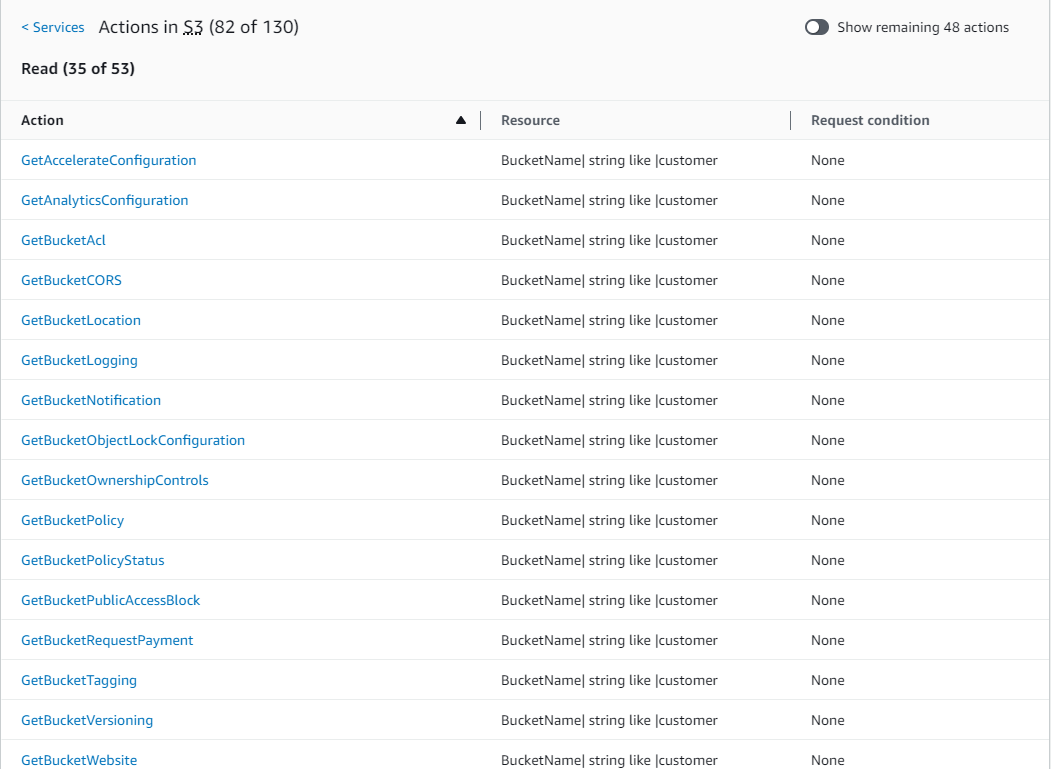
Service summary for DenyCustomerBucket S3 showing explicitly denied actions.

GetObject (Read) Action Summary:

Action summary for GetObject showing denied resources in the DenyCustomerBucket policy.

Policy 2: DynamoDbRowCognitoID

This policy provides row-level access to Amazon DynamoDB based on the user's Amazon Cognito ID.

JSON
{ "Version":"2012-10-17", "Statement": [ { "Effect": "Allow", "Action": [ "dynamodb:DeleteItem", "dynamodb:GetItem", "dynamodb:PutItem", "dynamodb:UpdateItem" ], "Resource": [ "arn:aws-eusc:dynamodb:us-west-1:123456789012:table/myDynamoTable" ], "Condition": { "ForAllValues:StringEquals": { "dynamodb:LeadingKeys": [ "${cognito-identity.amazonaws.com:sub}" ] } } } ] }

DynamoDbRowCognitoID Policy Summary:

Policy summary for DynamoDbRowCognitoID showing DynamoDB service with allowed access level.

DynamoDbRowCognitoID DynamoDB (Allow) Service Summary:
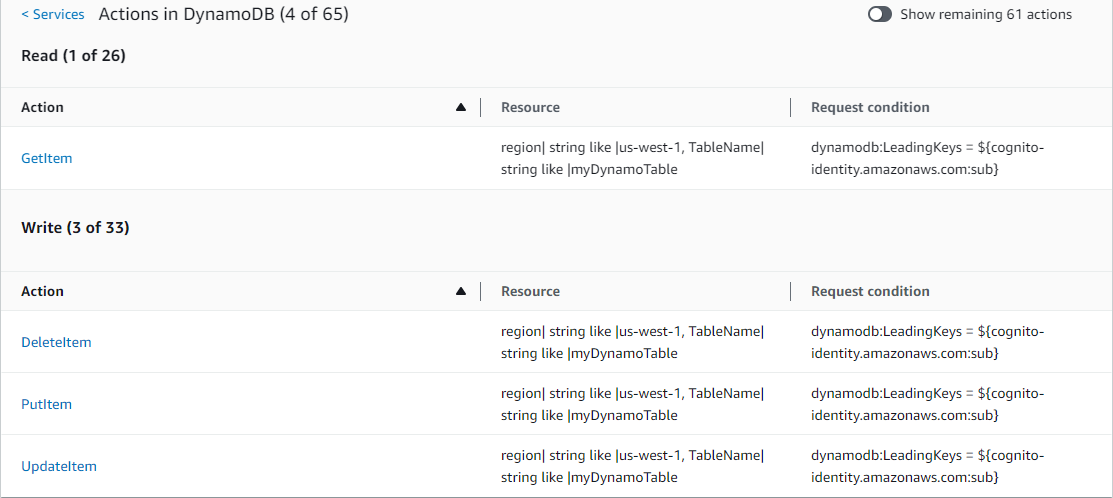
Service summary for DynamoDbRowCognitoID DynamoDB showing allowed actions.

GetItem (List) Action Summary:

Action summary for GetItem showing allowed resources with conditions in the DynamoDbRowCognitoID policy.

Policy 3: MultipleResourceCondition

This policy includes multiple resources and conditions.

JSON
{ "Version":"2012-10-17", "Statement": [ { "Effect": "Allow", "Action": [ "s3:PutObject", "s3:PutObjectAcl" ], "Resource": ["arn:aws-eusc:s3:::Apple_bucket/*"], "Condition": {"StringEquals": {"s3:x-amz-acl": ["public-read"]}} }, { "Effect": "Allow", "Action": [ "s3:PutObject", "s3:PutObjectAcl" ], "Resource": ["arn:aws-eusc:s3:::Orange_bucket/*"], "Condition": {"StringEquals": { "s3:x-amz-acl": ["custom"], "s3:x-amz-grant-full-control": ["1234"] }} } ] }

MultipleResourceCondition Policy Summary:

Policy summary for MultipleResourceCondition showing S3 service with allowed access level.

MultipleResourceCondition S3 (Allow) Service Summary:
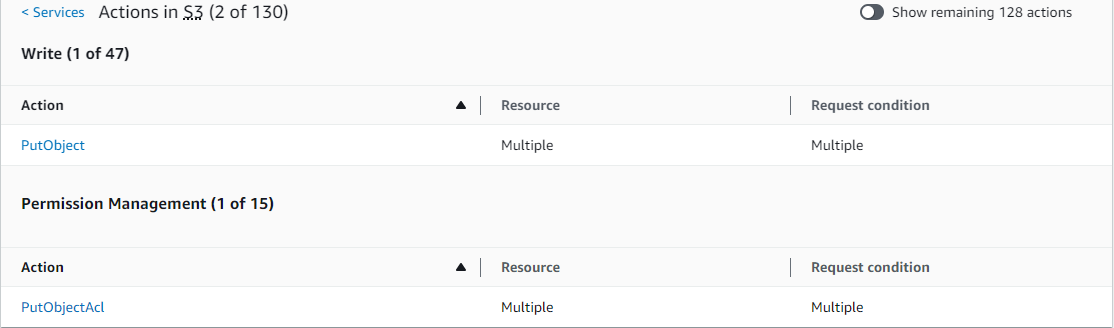
Service summary for MultipleResourceCondition S3 showing allowed actions.

PutObject (Write) Action Summary:

Action summary for PutObject showing allowed resources with conditions in the MultipleResourceCondition policy.

Policy 4: EC2_troubleshoot

The following policy allows users to get a screenshot of a running Amazon EC2 instance, which can help with EC2 troubleshooting. This policy also permits viewing information about the items in the Amazon S3 developer bucket.

JSON
{ "Version":"2012-10-17", "Statement": [ { "Effect": "Allow", "Action": [ "ec2:GetConsoleScreenshot" ], "Resource": [ "*" ] }, { "Effect": "Allow", "Action": [ "s3:ListBucket" ], "Resource": [ "arn:aws-eusc:s3:::developer" ] } ] }

EC2_Troubleshoot Policy Summary:

Policy summary for EC2_Troubleshoot showing EC2 and S3 services with allowed access levels.

EC2_Troubleshoot S3 (Allow) Service Summary:

Service summary for EC2_Troubleshoot S3 showing allowed actions.

ListBucket (List) Action Summary:

Action summary for ListBucket showing allowed resources in the EC2_Troubleshoot policy.

Policy 5: CodeBuild_CodeCommit_CodeDeploy

This policy provides access to specific CodeBuild, CodeCommit, and CodeDeploy resources. Because these resources are specific to each service, they appear only with the matching service. If you include a resource that does not match any services in the Action element, then the resource appears in all action summaries.

JSON
{ "Version":"2012-10-17", "Statement": [ { "Sid": "Stmt1487980617000", "Effect": "Allow", "Action": [ "codebuild:*", "codecommit:*", "codedeploy:*" ], "Resource": [ "arn:aws-eusc:codebuild:eusc-de-east-1:123456789012:project/my-demo-project", "arn:aws-eusc:codecommit:eusc-de-east-1:123456789012:MyDemoRepo", "arn:aws-eusc:codedeploy:eusc-de-east-1:123456789012:application:WordPress_App", "arn:aws-eusc:codedeploy:eusc-de-east-1:123456789012:instance/AssetTag*" ] } ] }

CodeBuild_CodeCommit_CodeDeploy Policy Summary:
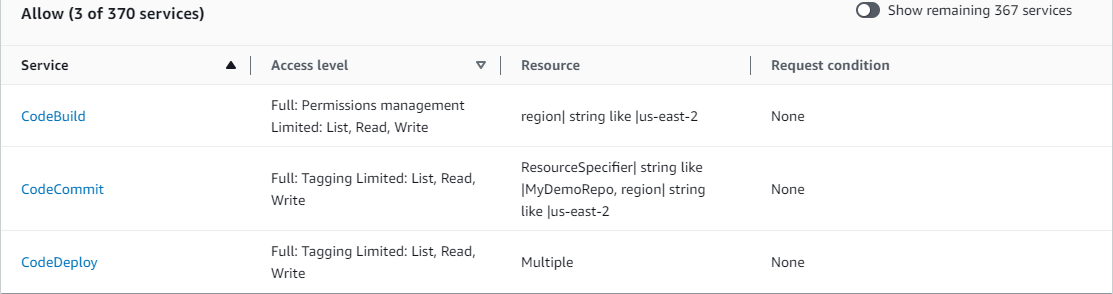
Policy summary for CodeBuild_CodeCommit_CodeDeploy showing multiple services with allowed access levels.

CodeBuild_CodeCommit_CodeDeploy CodeBuild (Allow) Service Summary:
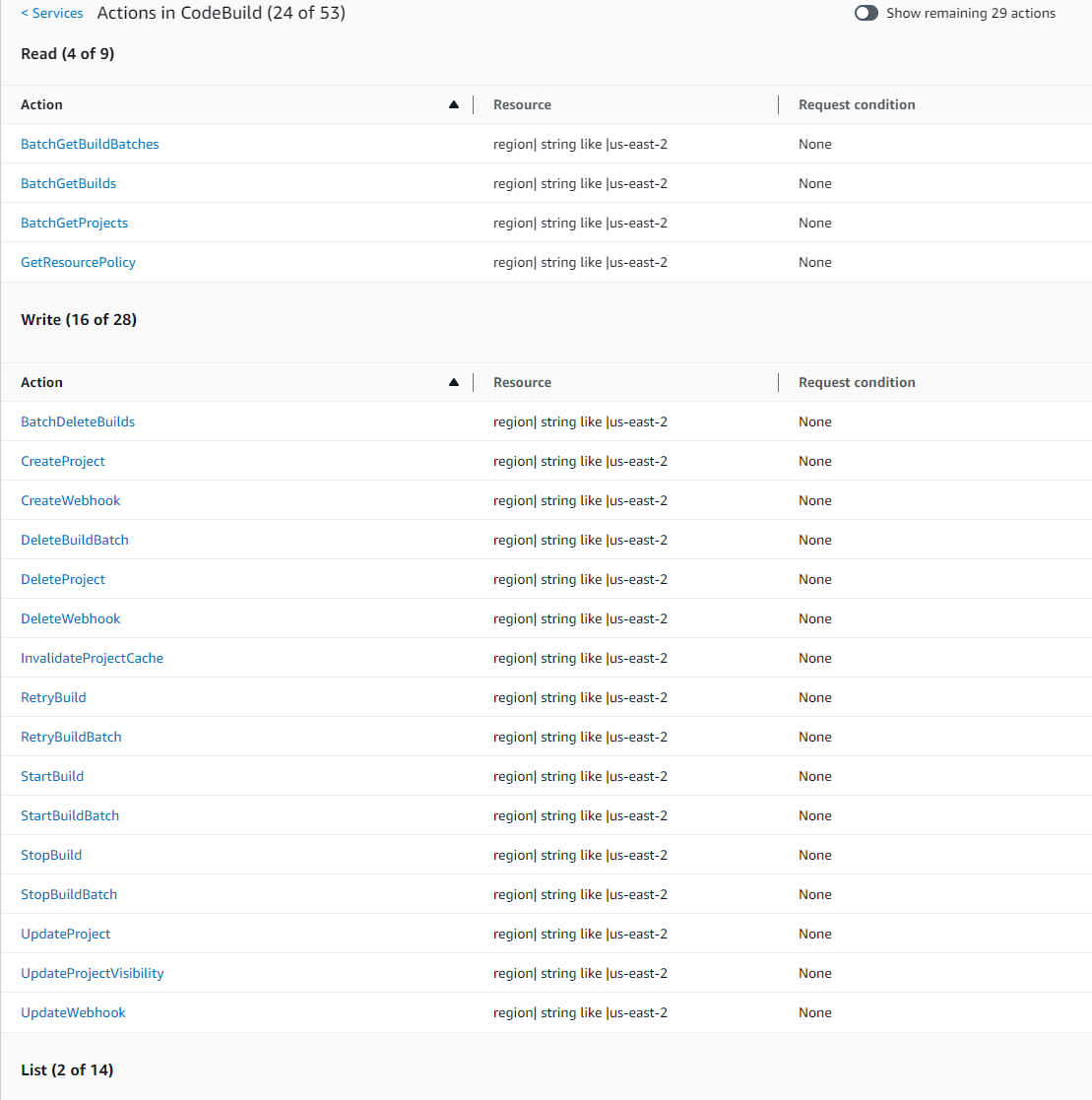
Service summary for CodeBuild_CodeCommit_CodeDeploy CodeBuild showing allowed actions.

CodeBuild_CodeCommit_CodeDeploy StartBuild (Write) Action Summary:

Action summary for StartBuild showing allowed resources in the CodeBuild_CodeCommit_CodeDeploy policy.