Query NCSA log file format
IIS also uses the NCSA
logging
The following example shows data in the NCSA common log format as documented for IIS.
198.51.100.7 - ExampleCorp\Li [10/Oct/2019:13:55:36 -0700] "GET /logo.gif HTTP/1.0" 200 232
198.51.100.14 - AnyCompany\Jorge [24/Nov/2019:10:49:52 -0700] "GET /index.html HTTP/1.1" 200 2165
198.51.100.22 - ExampleCorp\Mateo [27/Dec/2019:11:38:12 -0700] "GET /about.html HTTP/1.1" 200 1287
198.51.100.9 - AnyCompany\Nikki [11/Jan/2020:11:40:11 -0700] "GET /image.png HTTP/1.1" 404 230
198.51.100.2 - ExampleCorp\Ana [15/Feb/2019:10:12:22 -0700] "GET /favicon.ico HTTP/1.1" 404 30
198.51.100.13 - AnyCompany\Saanvi [14/Mar/2019:11:40:33 -0700] "GET /intro.html HTTP/1.1" 200 1608
198.51.100.11 - ExampleCorp\Xiulan [22/Apr/2019:10:51:34 -0700] "GET /group/index.html HTTP/1.1" 200 1344
Create a table in Athena for IIS NCSA logs
For your CREATE TABLE statement, you can use the Grok SerDe and a grok pattern similar to
the one for Apache web server logs. Unlike
Apache logs, the grok pattern uses %{DATA:user_id} for the third field
instead of %{USERNAME:user_id} to account for the presence of the
backslash in domain\user_id. For more information about using the Grok
SerDe, see Writing grok
custom classifiers in the AWS Glue Developer Guide.
To create a table in Athena for IIS NCSA web server logs
Open the Athena console at https://eusc-de-east-1.console.amazonaws-eusc.eu/athena/
. -
Paste the following DDL statement into the Athena Query Editor. Modify the values in
LOCATION 's3://amzn-s3-demo-bucket/to point to your IIS NCSA logs in Amazon S3.iis-ncsa-logs/'CREATE EXTERNAL TABLE iis_ncsa_logs( client_ip string, client_id string, user_id string, request_received_time string, client_request string, server_status string, returned_obj_size string ) ROW FORMAT SERDE 'com.amazonaws.glue.serde.GrokSerDe' WITH SERDEPROPERTIES ( 'input.format'='^%{IPV4:client_ip} %{DATA:client_id} %{DATA:user_id} %{GREEDYDATA:request_received_time} %{QUOTEDSTRING:client_request} %{DATA:server_status} %{DATA: returned_obj_size}$' ) STORED AS INPUTFORMAT 'org.apache.hadoop.mapred.TextInputFormat' OUTPUTFORMAT 'org.apache.hadoop.hive.ql.io.HiveIgnoreKeyTextOutputFormat' LOCATION 's3://amzn-s3-demo-bucket/iis-ncsa-logs/'; -
Run the query in the Athena console to register the
iis_ncsa_logstable. When the query completes, the logs are ready for you to query from Athena.
Example select queries for IIS NCSA logs
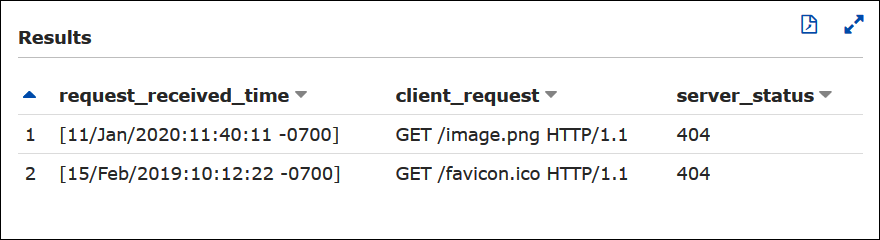
Example– Filtering for 404 errors
The following example query selects the request received time, text of the
client request, and server status code from the iis_ncsa_logs
table. The WHERE clause filters for HTTP status code
404 (page not found).
SELECT request_received_time, client_request, server_status
FROM iis_ncsa_logs
WHERE server_status = '404'
The following image shows the results of the query in the Athena Query Editor.
Example– Filtering for successful requests from a particular domain
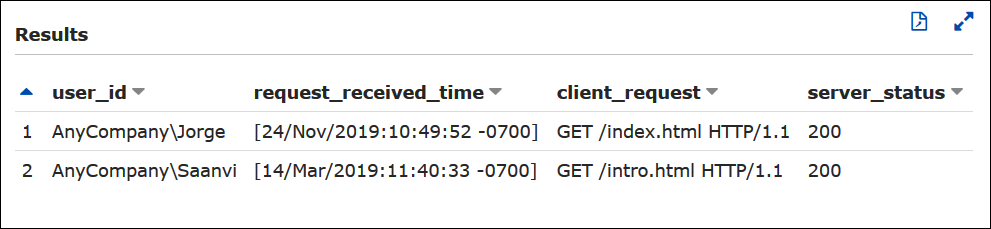
The following example query selects the user ID, request received time, text
of the client request, and server status code from the
iis_ncsa_logs table. The WHERE clause filters for
requests with HTTP status code 200 (successful) from users in the
AnyCompany domain.
SELECT user_id, request_received_time, client_request, server_status
FROM iis_ncsa_logs
WHERE server_status = '200' AND user_id LIKE 'AnyCompany%'
The following image shows the results of the query in the Athena Query Editor.