Authenticating users with Amazon Cognito user pools
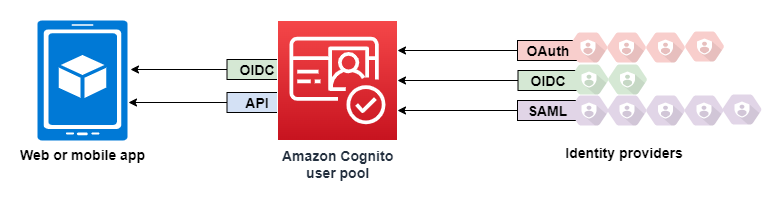
An Amazon Cognito user pool is a user directory for web and mobile app authentication and authorization. From the perspective of your app, an Amazon Cognito user pool is an OpenID Connect (OIDC) identity provider (IdP). A user pool adds layers of additional features for security, identity federation, app integration, and customization of the user experience.
This chapter covers how your users authenticate: signing up, signing in, and the authentication flows a user pool supports, including sign-in through external identity providers. Related tasks are covered in their own chapters—managing the users in your directory, customizing behavior with AWS Lambda triggers, and protecting the pool with threat protection.
Topics
Features
Amazon Cognito user pools have the following features.
Sign-up
Amazon Cognito user pools have user-driven, administrator-driven, and programmatic methods to add user profiles to your user pool. Amazon Cognito user pools supports the following sign-up models. You can use any combination of these models in your app.
Important
If you activate user sign-up in your user pool, anyone on the internet can sign up for an account and sign into your apps. Don't enable self-registration in your user pool unless you want to open your app to public sign-up. To change this setting, update Self-service sign-up in the Sign-up menu under Authentication in the user pool console, or update the value of AllowAdminCreateUserOnly in a CreateUserPool or UpdateUserPool API request.
For information about security features that you can set up in your user pools, see Protecting user pools with threat protection.
-
Your users can enter their information in your app and create a user profile that’s native to your user pool. You can call API sign-up operations to register users in your user pool. You can open these sign-up operations to anyone, or you can authorize them with a client secret or AWS credentials.
-
You can redirect users to a third-party IdP that they can authorize to pass their information to Amazon Cognito. Amazon Cognito processes OIDC id tokens, OAuth 2.0
userInfodata, and SAML 2.0 assertions into user profiles in your user pool. You control the attributes that you want Amazon Cognito to receive based on attribute-mapping rules. -
You can skip public or federated sign-up and create users yourself, based on your own data source and schema, in any of these ways:
-
Add users directly in the Amazon Cognito console or with the API.
-
Import users in bulk from a CSV file.
-
Run a just-in-time AWS Lambda function that looks up each new user in an existing directory and populates their profile from that data.
-
After your users sign up, you can add them to groups that Amazon Cognito lists in the access and ID tokens. You can also link user pool groups to IAM roles when you pass the ID token to an identity pool.
Related topics
Sign-in
Amazon Cognito can be a standalone user directory and identity provider (IdP) to your app. Your users can sign in with managed login pages that are hosted by Amazon Cognito, or with a custom-built user authentication service through the Amazon Cognito user pools API. The application tier behind your custom-built front end can authorize requests on the back end with any of several methods to confirm legitimate requests.
Users can set up and sign with usernames and passwords, passkeys, and email and SMS message one-time passwords. You can offer consolidate sign in with external user directories, multi-factor authentication (MFA) after sign-in, trust remembered devices, and custom authentication flows that you design.
To sign in users with an external directory, optionally combined with the user directory built in to Amazon Cognito, you can add the following integrations.
-
Sign in and import customer user data with OAuth 2.0 social sign-in. Amazon Cognito supports sign-in with Google, Facebook, Amazon, and Apple through OAuth 2.0.
-
Sign in and import work and school user data with SAML and OIDC sign-in. You can also configure Amazon Cognito to accept claims from any SAML or OpenID Connect (OIDC) identity provider (IdP).
-
Link external user profiles to native user profiles. A linked user can sign in with a third-party user identity and receive access that you assign to a user in the built-in directory.
Related topics
Machine-to-machine authorization
Some sessions aren’t a human-to-machine interaction. You might need a service account
that can authorize a request to an API by an automated process. To generate access tokens
for machine-to-machine authorization with OAuth 2.0 scopes, you can add an app client that
generates client-credentials grantsGetClientToken API operation, which requires no user pool domain.
Related topics
Managed login
When you don’t want to build a user interface, you can present your users with a customized managed login pages. Managed login is a set of web pages for sign-up, sign-in, multi-factor authentication (MFA), and password reset. You can add managed login to your existing domain, or use a prefix domain in an AWS subdomain.
Managed login has an alternative: the classic hosted UI, a first-generation version with a simpler design and fewer features. You choose one or the other for a user pool domain—they aren't used together. The following table compares the two options.
Feature |
Classic hosted UI |
Managed login |
|---|---|---|
Branding version |
Hosted UI (classic) |
Managed login |
Customization |
File-based branding (logo image and a CSS values file) |
Visual branding editor in the Amazon Cognito console |
Feature plans |
All plans, including Lite |
Essentials and Plus |
Passkey sign-in |
Not available |
Available |
Note
The classic hosted UI is available in all feature plans, including Lite. Managed login and its branding editor require the Essentials or Plus feature plan. For more information, see User pool feature plans.
To set up managed login, complete these prerequisites in order:
-
Create a user pool. See Create a new application in the Amazon Cognito console.
-
Add a user pool domain (a prefix domain or a custom domain). See Configuring a user pool domain.
-
Create an app client and set its branding version and return URL. See User pool managed login.
Related topics
Threat protection
Protect your users against password guessing, account takeover, and malicious traffic with multi-factor authentication (MFA), adaptive authentication, and AWS WAF web ACLs. These protections are covered in Protecting user pools with threat protection.
Custom user experience
At most stages of sign-up, sign-in, or profile update, you can customize how Amazon Cognito handles the request with Lambda triggers and custom authentication flows, and give managed login a familiar look and feel. See Customizing user pool workflows with Lambda triggers.
Monitoring and analytics
Amazon Cognito user pools log API requests to AWS CloudTrail, publish performance metrics to Amazon CloudWatch Logs, and monitor message delivery and request volume. See Amazon Cognito logging in AWS CloudTrail.
Amazon Cognito identity pools integration
The other half of Amazon Cognito is identity pools. Identity pools provide credentials that authorize and monitor API requests to AWS services, for example Amazon DynamoDB or Amazon S3, from your users. You can build identity-based access policies that protect your data based on how you classify the users in your user pool. Identity pools can also accept tokens and SAML 2.0 assertions from a variety of identity providers, independently of user pool authentication.