Help improve this page
To contribute to this user guide, choose the Edit this page on GitHub link that is located in the right pane of every page.
Configuring control plane egress routing
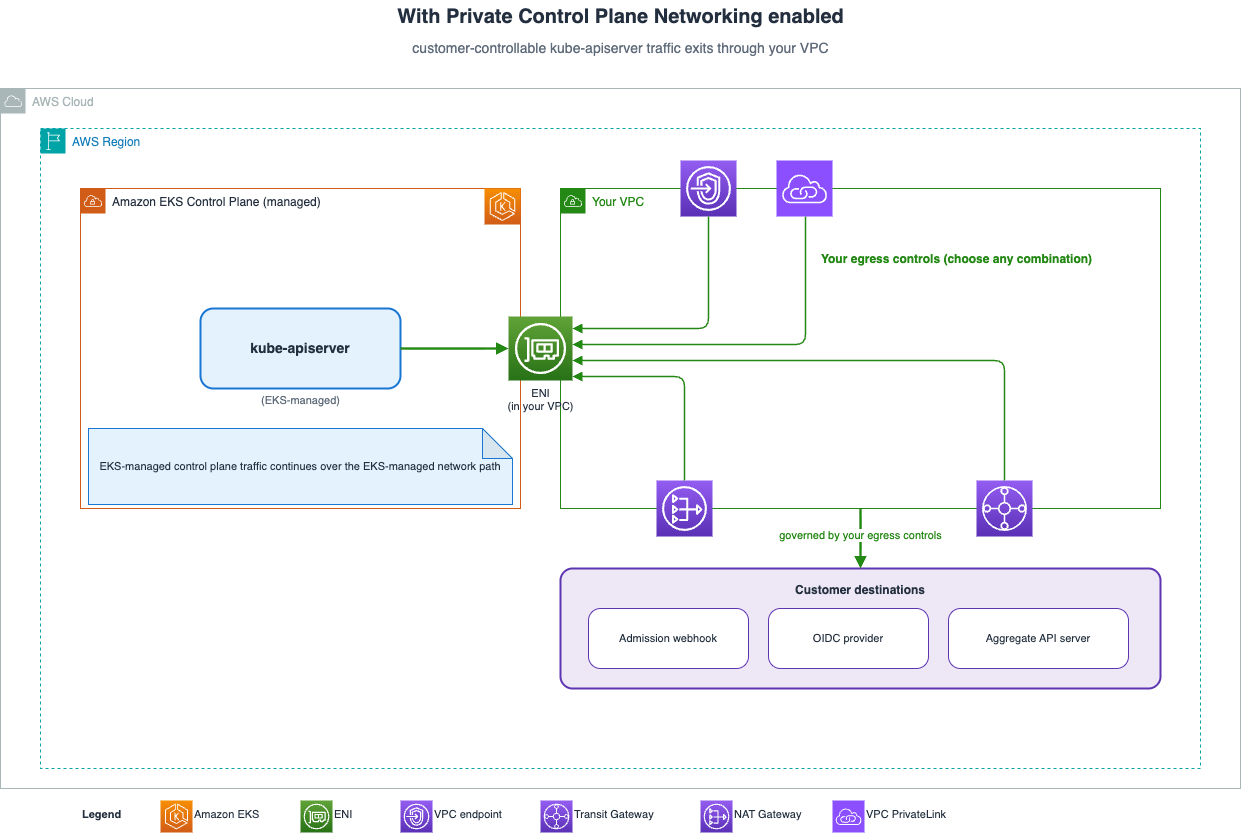
By default, Amazon EKS manages the egress networking from the Kubernetes control plane to resources in your VPC. Use control plane egress routing to change this behavior and manage the network path yourself. This gives you full control over how traffic from the control plane elastic network interfaces (ENIs) reaches your VPC resources. You can route through your own NAT gateways, firewalls, or inspection appliances.
Egress routing modes
Amazon EKS supports the following control plane egress routing modes:
| Mode | Description |
|---|---|
|
|
Default behavior. Amazon EKS manages the egress path from the control plane ENIs. You don’t need to configure NAT gateways or other routing infrastructure for control plane traffic. |
|
|
You manage the egress path from the control plane in your VPC subnets. You are responsible for ensuring that the control plane can reach required endpoints (such as webhook servers, OIDC providers, and other resources). You provide an egress path, such as a NAT gateway, NAT instance, transit gateway, or firewall appliance. You also configure the route table, network ACL, and security group rules that allow this traffic. |
Important
In CUSTOMER_ROUTED mode, you’re responsible for ensuring proper network connectivity from the control plane. Misconfigurations in your VPC networking can cause control plane operations to fail. These misconfigurations include a missing egress path, restrictive network ACLs, or incorrect security groups. Affected operations include admission webhook calls and OIDC authentication.
Prerequisites
Your VPC and subnets must meet the standard Amazon EKS networking requirements. For more information, see View Amazon EKS networking requirements for VPC and subnets.
In CUSTOMER_ROUTED mode, the Kubernetes API server sends customer-facing traffic outbound through the cross-account network interfaces. Amazon EKS already creates these interfaces in your subnets for control plane to node communication. This traffic includes calls to admission webhooks and OIDC providers. Amazon EKS doesn’t create separate egress network interfaces. This mode changes how the existing interfaces are used. The subnets that hold these interfaces must meet the following requirements:
-
The subnets must have a route to the endpoints the control plane needs to reach (such as webhook servers and OIDC providers). For endpoints outside your VPC, this usually means a default route to an egress device. The default route is
0.0.0.0/0for IPv4, and::/0for IPv6. The egress device can be a NAT gateway, NAT instance, firewall, or a transit gateway to a centralized egress VPC. The choice of egress device is yours; Amazon EKS only requires that the path works. -
Security groups on the cross-account network interfaces must allow outbound traffic on ports required by your workloads (for example, port 443 for webhooks and OIDC providers).
-
Network ACLs on the subnets must allow outbound traffic and the corresponding inbound ephemeral port range for return traffic.
In CUSTOMER_ROUTED mode, the control plane resolves hostnames using your VPC’s DNS configuration. This enables the control plane to reach endpoints in Route 53 private hosted zones and on-premises DNS forwarded through Route 53 Resolver endpoints.
-
Your VPC DHCP options set must include
AmazonProvidedDNSin its domain name servers list. This is required for the control plane to resolve DNS names within the VPC. If your cluster uses external webhook endpoints or OIDC providers with public DNS names, the resolver must also resolve public hostnames. Ensure the resolver can handle both VPC and public DNS resolution.
The following table summarizes the traffic the control plane sends through your VPC in CUSTOMER_ROUTED mode:
| Traffic | Destination | Port | Notes |
|---|---|---|---|
|
Admission webhooks |
Webhook endpoints (customer-defined URLs) |
443 (typically) |
Only if webhooks are configured. Leaves the VPC through your egress device if the endpoint is external. |
|
OIDC discovery |
OIDC issuer URL |
443 |
Only if an OIDC provider is configured. Leaves the VPC through your egress device if the issuer is external. |
|
Aggregated API servers |
Customer API server endpoints |
443 |
Only if configured. Leaves the VPC through your egress device if the endpoint is external. |
|
Kubelet API |
Worker node IP addresses |
10250 |
This is traffic between the control plane and your nodes through the cluster ENI; it does not traverse your egress device. It requires that route tables, security groups, and network ACLs allow traffic across the cluster ENI between the control plane and your nodes. |
Note
Only the traffic listed in this table is affected by your egress configuration. EKS-managed control plane traffic (such as communication with etcd, CloudWatch Logs, and internal EKS services) continues through the AWS managed network path and is not affected by your VPC configuration.
Create a cluster with customer-routed egress
You can specify the control plane egress mode when you create a new cluster.
Example
You can use ipFamily=ipv6 for IPv6 clusters. When using IPv6 with CUSTOMER_ROUTED mode, ensure your subnets have an egress-only internet gateway for IPv6 traffic in addition to a NAT gateway for IPv4 traffic.
Example
- AWS Management Console
-
-
Open the Amazon EKS console
. -
Choose Add cluster, and then choose Create.
-
On the Networking page, for Control plane egress, select Customer routed.
-
Complete the remaining cluster configuration and choose Create.
-
For AWS CloudFormation, set ControlPlaneEgressMode: CUSTOMER_ROUTED in ResourcesVpcConfig. Terraform support for this field will be available in a future release of the AWS Provider
Note
Switching to CUSTOMER_ROUTED is a one-way operation. After you enable customer-routed egress on a cluster, you cannot revert to AWS_MANAGED.
Update an existing cluster
You can change the control plane egress mode on an existing cluster using the update-cluster-config command.
aws eks update-cluster-config \
    --name my-cluster \
    --resources-vpc-config "controlPlaneEgressMode=CUSTOMER_ROUTED" \
    --region region-code
Monitor the update status:
aws eks describe-update \
    --name my-cluster \
    --update-id update-id \
    --region region-code
The update is complete when the status shows Successful. The update type is ControlPlaneEgressUpdate. The update typically completes within 10 minutes.
Important
Switching to CUSTOMER_ROUTED is a one-way operation. After you enable customer-routed egress on a cluster, you cannot revert to AWS_MANAGED.
Before you switch, confirm that your VPC meets the requirements in Prerequisites. If the control plane loses connectivity to the required endpoints after the update, operations such as admission webhook calls and OIDC authentication can fail.
IPv6 considerations
If you run an IPv6 cluster with customer-routed egress, you need to configure both IPv4 and IPv6 egress paths.
When running an IPv6 cluster (ipFamily=ipv6) with CUSTOMER_ROUTED egress:
-
The control plane ENIs are assigned both IPv4 and IPv6 addresses.
-
You must configure both IPv4 and IPv6 egress paths:
-
IPv4: a default route (
0.0.0.0/0) to your egress device (for example, a NAT gateway). -
IPv6: a
::/0route to an IPv6 egress device (for example, an egress-only internet gateway).
-
-
Security groups and NACLs must allow traffic on both IP versions.
-
If your OIDC provider or webhook endpoints are IPv4-only, ensure IPv4 NAT is functional.
Considerations
Keep the following points in mind when you use customer-routed control plane egress:
-
Your responsibility: In
CUSTOMER_ROUTEDmode, you own the network path from the control plane to your external endpoints. If that path breaks, control plane operations that depend on it (such as admission webhook calls and OIDC authentication) can fail until you restore connectivity. -
VPC-internal traffic is unaffected: Traffic between the control plane and your nodes (for example, the kubelet API on port 10250) through the cluster ENI does not depend on your egress device.
-
EKS Auto Mode: Control plane egress routing works the same way on both Standard and Auto Mode clusters because the control plane architecture is identical.
-
EKS Capabilities: EKS Capabilities (such as ArgoCD, ACK, and KRO) run in separate AWS managed infrastructure. Traffic from EKS Capabilities controllers is not routed through your VPC by this feature.
-
Observability: If you enable VPC Flow Logs on your VPC or cluster subnets, you can observe egress traffic that routes through your VPC. This includes calls to webhook and OIDC endpoints. If VPC Flow Logs are not enabled, this traffic is not logged.
IAM condition key
Amazon EKS supports the eks:controlPlaneEgressMode condition key. You can use this key in IAM policies or service control policies (SCPs) to control which egress mode callers can specify when they create or update clusters.
The condition key applies to the following actions:
-
eks:CreateCluster -
eks:UpdateClusterConfig
For example, the following SCP denies cluster creation and configuration updates unless the caller specifies CUSTOMER_ROUTED:
{
  "Version": "2012-10-17",
  "Statement": [
    {
      "Sid": "RequireCustomerRoutedControlPlane",
      "Effect": "Deny",
      "Action": [
        "eks:CreateCluster",
        "eks:UpdateClusterConfig"
      ],
      "Resource": "*",
      "Condition": {
        "StringNotEquals": {
          "eks:controlPlaneEgressMode": "CUSTOMER_ROUTED"
        }
      }
    }
  ]
}
Use this policy to enforce that all new and updated clusters in your organization use the CUSTOMER_ROUTED egress mode.
OIDC provider configuration
If your cluster uses an OIDC identity provider, the control plane must be able to reach the OIDC discovery endpoint over HTTPS (port 443). This applies to IAM roles for service accounts, or an OIDC identity provider you associate for cluster authentication. There is no OIDC-specific setting; it uses the same egress path you configure in Prerequisites. To allow it:
-
Confirm the control plane subnets have a route that covers the OIDC endpoint (typically a default route to your egress device, such as a NAT gateway).
-
Confirm the cluster security group allows outbound TCP 443.
-
Confirm the subnet NACLs allow outbound TCP 443 and inbound ephemeral return traffic (ports 1024–65535).
The endpoint depends on your provider:
-
Amazon EKS OIDC provider (default):
oidc.eks.region-code.amazonaws.com -
Custom OIDC provider: the issuer URL you configured.
If OIDC authentication fails, for troubleshooting steps see OIDC provider unreachable.
Verify connectivity
After configuring CUSTOMER_ROUTED egress, verify that the control plane can reach your VPC resources:
-
Check the current egress mode: Confirm the cluster is using the mode you expect.
aws eks describe-cluster --name my-cluster \ --query "cluster.resourcesVpcConfig.controlPlaneEgressMode" \ --region region-code -
Check cluster status: The cluster should be in
ACTIVEstate.aws eks describe-cluster --name my-cluster --query "cluster.status" --region region-code -
Test webhook connectivity: If you have admission webhooks configured, create a resource that triggers the webhook and confirm it succeeds.
-
Verify node registration: Launch a node and confirm it successfully joins the cluster.
kubectl get nodes -
Check OIDC: If using IAM roles for service accounts (IRSA), verify that pods can assume their IAM roles.
For troubleshooting common issues, see Troubleshooting control plane egress issues.