Las traducciones son generadas a través de traducción automática. En caso de conflicto entre la traducción y la version original de inglés, prevalecerá la version en inglés.
Migre a OpenTelemetry Go
Utilice los siguientes ejemplos de código para instrumentar manualmente sus aplicaciones Go con el OpenTelemetry SDK al migrar desde X-Ray.
Instrumentación manual con el SDK
- Tracing setup with X-Ray SDK
-
Al usar el SDK de X-Ray para Go, era necesario configurar los complementos de servicio o las reglas de muestreo locales antes de instrumentar el código.
func init() { if os.Getenv("ENVIRONMENT") == "production" { ec2.Init() } xray.Configure(xray.Config{ DaemonAddr: "127.0.0.1:2000", ServiceVersion: "1.2.3", }) } - Set up tracing with OpenTelemetry SDK
-
Configure el OpenTelemetry SDK creando una instancia de un TracerProvider y registrándolo como proveedor de rastreadores globales. Se recomienda configurar los siguientes componentes:
-
Exportador de trazas OTLP: necesario para exportar trazas al agente o al recopilador CloudWatch OpenTelemetry
-
Propagador de rayos X: necesario para propagar el contexto de la traza a AWS los servicios integrados con X-Ray
-
Muestreador remoto de X-Ray: necesario para solicitudes de muestreo con las reglas de muestreo de X-Ray
-
Detectores de recursos: para detectar los metadatos del host que ejecuta la aplicación
import ( "go.opentelemetry.io/contrib/detectors/aws/ec2" "go.opentelemetry.io/contrib/propagators/aws/xray" "go.opentelemetry.io/contrib/samplers/aws/xray" "go.opentelemetry.io/otel" "go.opentelemetry.io/otel/exporters/otlp/otlptrace/otlptracegrpc" "go.opentelemetry.io/otel/sdk/trace" ) func setupTracing() error { ctx := context.Background() exporterEndpoint := os.Getenv("OTEL_EXPORTER_OTLP_ENDPOINT") if exporterEndpoint == "" { exporterEndpoint = "localhost:4317" } traceExporter, err := otlptracegrpc.New(ctx, otlptracegrpc.WithInsecure(), otlptracegrpc.WithEndpoint(exporterEndpoint)) if err != nil { return fmt.Errorf("failed to create OTLP trace exporter: %v", err) } remoteSampler, err := xray.NewRemoteSampler(ctx, "my-service-name", "ec2") if err != nil { return fmt.Errorf("failed to create X-Ray Remote Sampler: %v", err) } ec2Resource, err := ec2.NewResourceDetector().Detect(ctx) if err != nil { return fmt.Errorf("failed to detect EC2 resource: %v", err) } tp := trace.NewTracerProvider( trace.WithSampler(remoteSampler), trace.WithBatcher(traceExporter), trace.WithResource(ec2Resource), ) otel.SetTracerProvider(tp) otel.SetTextMapPropagator(xray.Propagator{}) return nil } -
Seguimiento de solicitudes entrantes (instrumentación de controlador HTTP)
- With X-Ray SDK
-
Para instrumentar un manejador HTTP con X-Ray, se usó el método de manejador de X-Ray para generar segmentos usando. NewFixedSegmentNamer
func main() { http.Handle("/", xray.Handler(xray.NewFixedSegmentNamer("myApp"), http.HandlerFunc(func(w http.ResponseWriter, r *http.Request) { w.Write([]byte("Hello!")) }))) http.ListenAndServe(":8000", nil) } - With OpenTelemetry SDK
Para instrumentar un controlador HTTP con OpenTelemetry, usa el método newHandler para empaquetar el código OpenTelemetry del controlador original.
import (
    "go.opentelemetry.io/contrib/instrumentation/net/http/otelhttp"
)

helloHandler := func(w http.ResponseWriter, req *http.Request) {
    ctx := req.Context()
    span := trace.SpanFromContext(ctx)
    span.SetAttributes(attribute.Bool("isHelloHandlerSpan", true), attribute.String("attrKey", "attrValue"))

    _, _ = io.WriteString(w, "Hello World!\n")
}

otelHandler := otelhttp.NewHandler(http.HandlerFunc(helloHandler), "Hello")

http.Handle("/hello", otelHandler)
err = http.ListenAndServe(":8080", nil)
if err != nil {
    log.Fatal(err)
}
AWS Instrumentación SDK for Go v2
- With X-Ray SDK
-
Para instrumentar AWS las solicitudes salientes del AWS SDK, sus clientes se instrumentaron de la siguiente manera:
// Create a segment ctx, root := xray.BeginSegment(context.TODO(), "AWSSDKV2_Dynamodb") defer root.Close(nil) cfg, err := config.LoadDefaultConfig(ctx, config.WithRegion("us-west-2")) if err != nil { log.Fatalf("unable to load SDK config, %v", err) } // Instrumenting AWS SDK v2 awsv2.AWSV2Instrumentor(&cfg.APIOptions) // Using the Config value, create the DynamoDB client svc := dynamodb.NewFromConfig(cfg) // Build the request with its input parameters _, err = svc.ListTables(ctx, &dynamodb.ListTablesInput{ Limit: aws.Int32(5), }) if err != nil { log.Fatalf("failed to list tables, %v", err) } - With OpenTelemetry SDK
-
El AWS SDK for Go v2 Instrumentation proporciona soporte para el rastreo OpenTelemetry de las llamadas descendentes del AWS SDK. A continuación, se muestra un ejemplo de seguimiento de la llamada de un cliente de S3:
import (
    ...

    "github.com/aws/aws-sdk-go-v2/config"
    "github.com/aws/aws-sdk-go-v2/service/s3"

    "go.opentelemetry.io/otel"
    oteltrace "go.opentelemetry.io/otel/trace"
    awsConfig "github.com/aws/aws-sdk-go-v2/config"
    "go.opentelemetry.io/contrib/instrumentation/github.com/aws/aws-sdk-go-v2/otelaws"
)

...


    // init aws config
    cfg, err := awsConfig.LoadDefaultConfig(ctx)
    if err != nil {
        panic("configuration error, " + err.Error())
    }

    // instrument all aws clients
    otelaws.AppendMiddlewares(&.APIOptions)


    // Call to S3
    s3Client := s3.NewFromConfig(cfg)
    input := &s3.ListBucketsInput{}
    result, err := s3Client.ListBuckets(ctx, input)
    if err != nil {
        fmt.Printf("Got an error retrieving buckets, %v", err)
        return
    }
Instrumentación de llamadas a HTTP salientes
- With X-Ray SDK
-
Para instrumentar las llamadas a HTTP salientes con X-Ray, se utilizó el Xray.Client para crear una copia de un cliente HTTP proporcionado.
myClient := xray.Client(http-client) resp, err := ctxhttp.Get(ctx, xray.Client(nil), url) - With OpenTelemetry SDK
-
Para instrumentar a los clientes HTTP OpenTelemetry, utilice OpenTelemetry otelhttp. NewTransport método para envolver el http. DefaultTransport.
import (
    "go.opentelemetry.io/contrib/instrumentation/net/http/otelhttp"
)

// Create an instrumented HTTP client.
httpClient := &http.Client{
    Transport: otelhttp.NewTransport(
        http.DefaultTransport,
    ),
}

req, err := http.NewRequestWithContext(ctx, http.MethodGet, "https://api.github.com/repos/aws-observability/aws-otel-go/releases/latest", nil)
if err != nil {
    fmt.Printf("failed to create http request, %v\n", err)
}
res, err := httpClient.Do(req)
if err != nil {
    fmt.Printf("failed to make http request, %v\n", err)
}
// Request body must be closed
defer func(Body io.ReadCloser) {
    err := Body.Close()
    if err != nil {
        fmt.Printf("failed to close http response body, %v\n", err)
    }
}(res.Body)
Compatibilidad de instrumentación para otras bibliotecas
Puede encontrar la lista completa de instrumentaciones de biblioteca compatibles con los paquetes de OpenTelemetry Go under Instrumentation
Creación manual de datos de rastros
- With X-Ray SDK
-
Con el SDK de X-Ray, se necesitaban BeginSubsegment los métodos BeginSegment y métodos para crear manualmente segmentos y subsegmentos de rayos X.
// Start a segment ctx, seg := xray.BeginSegment(context.Background(), "service-name") // Start a subsegment subCtx, subSeg := xray.BeginSubsegment(ctx, "subsegment-name") // Add metadata or annotation here if necessary xray.AddAnnotation(subCtx, "annotationKey", "annotationValue") xray.AddMetadata(subCtx, "metadataKey", "metadataValue") subSeg.Close(nil) // Close the segment seg.Close(nil) - With OpenTelemetry SDK
Use intervalos personalizados para supervisar el rendimiento de las actividades internas que no se recopilan en las bibliotecas de instrumentación. Tenga en cuenta que solo los intervalos de tipo servidor se convierten en segmentos de X-Ray, todos los demás intervalos se convierten en subsegmentos de X-Ray.
En primer lugar, tendrá que crear un rastreador para generar intervalos, que puede obtener mediante el método
otel.Tracer. Esto proporcionará una instancia de Tracer de la TracerProvider que se registró globalmente en el ejemplo de configuración de rastreo. Puede crear tantas instancias de rastreador como necesite, pero es habitual tener un solo rastreador para toda la aplicación.tracer := otel.Tracer("application-tracer")import ( ... oteltrace "go.opentelemetry.io/otel/trace" ) ... var attributes = []attribute.KeyValue{ attribute.KeyValue{Key: "metadataKey", Value: attribute.StringValue("metadataValue")}, attribute.KeyValue{Key: "annotationKey", Value: attribute.StringValue("annotationValue")}, attribute.KeyValue{Key: "aws.xray.annotations", Value: attribute.StringSliceValue([]string{"annotationKey"})}, } ctx := context.Background() parentSpanContext, parentSpan := tracer.Start(ctx, "ParentSpan", oteltrace.WithSpanKind(oteltrace.SpanKindServer), oteltrace.WithAttributes(attributes...)) _, childSpan := tracer.Start(parentSpanContext, "ChildSpan", oteltrace.WithSpanKind(oteltrace.SpanKindInternal)) // ... childSpan.End() parentSpan.End()Añadir anotaciones y metadatos a los seguimientos con el SDK OpenTelemetry
En el ejemplo anterior, el método
WithAttributesse utiliza para agregar atributos a cada intervalo. Tenga en cuenta que de forma predeterminada, todos los atributos de intervalo se convierten en metadatos en los datos sin procesar de X-Ray. Para garantizar que un atributo se convierta en una anotación y no en metadatos, agregue la clave del atributo a la lista del atributoaws.xray.annotations. Para obtener más información, consulte Habilitar anotaciones de X-Ray personalizadas.
Instrumentación manual de Lambda
- With X-Ray SDK
-
Con el SDK de X-Ray, una vez que Lambda haya habilitado el rastreo activo, no se requiere ninguna configuración adicional para usar el SDK de X-Ray. Lambda ha creado un segmento que representa la invocación del controlador de Lambda y subsegmentos mediante el SDK de X-Ray sin necesidad de realizar ninguna configuración adicional.
- With OpenTelemetry SDK
-
El siguiente código de función Lambda (sin instrumentación) realiza una ListBuckets llamada a Amazon S3 y una solicitud HTTP saliente.
package main

import (
    "context"
    "encoding/json"
    "fmt"
    "io"
    "net/http"
    "os"

    "github.com/aws/aws-lambda-go/events"
    "github.com/aws/aws-lambda-go/lambda"
    awsconfig "github.com/aws/aws-sdk-go-v2/config"
    "github.com/aws/aws-sdk-go-v2/service/s3"
)

func lambdaHandler(ctx context.Context) (interface{}, error) {
    // Initialize AWS config.
    cfg, err := awsconfig.LoadDefaultConfig(ctx)
    if err != nil {
        panic("configuration error, " + err.Error())
    }

    s3Client := s3.NewFromConfig(cfg)

    // Create an HTTP client.
    httpClient := &http.Client{
        Transport: http.DefaultTransport,
    }

    input := &s3.ListBucketsInput{}
    result, err := s3Client.ListBuckets(ctx, input)
    if err != nil {
        fmt.Printf("Got an error retrieving buckets, %v", err)
    }

    fmt.Println("Buckets:")
    for _, bucket := range result.Buckets {
        fmt.Println(*bucket.Name + ": " + bucket.CreationDate.Format("2006-01-02 15:04:05 Monday"))
    }
    fmt.Println("End Buckets.")

    req, err := http.NewRequestWithContext(ctx, http.MethodGet, "https://api.github.com/repos/aws-observability/aws-otel-go/releases/latest", nil)
    if err != nil {
        fmt.Printf("failed to create http request, %v\n", err)
    }
    res, err := httpClient.Do(req)
    if err != nil {
        fmt.Printf("failed to make http request, %v\n", err)
    }
    defer func(Body io.ReadCloser) {
        err := Body.Close()
        if err != nil {
            fmt.Printf("failed to close http response body, %v\n", err)
        }
    }(res.Body)

    var data map[string]interface{}
    err = json.NewDecoder(res.Body).Decode(&data)
    if err != nil {
        fmt.Printf("failed to read http response body, %v\n", err)
    }
    fmt.Printf("Latest ADOT Go Release is '%s'\n", data["name"])

    return events.APIGatewayProxyResponse{
        StatusCode: http.StatusOK,
        Body:       os.Getenv("_X_AMZN_TRACE_ID"),
    }, nil
}

func main() {
    lambda.Start(lambdaHandler)
}
Para instrumentar manualmente el controlador de Lambda y el cliente de Amazon S3, haga lo siguiente:
-
En main (), cree una instancia de a TracerProvider (tp) y regístrelo como proveedor de rastreo global. Se TracerProvider recomienda configurarlo con:
-
Un procesador de intervalos simple con un exportador de intervalos de X-Ray UDP para enviar rastros al punto de conexión de UDP X-Ray de Lambda
-
Un recurso con service.name establecido en el nombre de la función de Lambda
-
-
Cambie el uso de
lambda.Start(lambdaHandler)alambda.Start(otellambda.InstrumentHandler(lambdaHandler, xrayconfig.WithRecommendedOptions(tp)...)). -
Instrumente el cliente Amazon S3 con la instrumentación del OpenTemetry AWS SDK añadiendo OpenTelemetry middleware for
aws-sdk-go-v2a la configuración del cliente de Amazon S3. -
Instrumente el cliente http utilizando el
otelhttp.NewTransportmétodo para OpenTelemetry empaquetar el.http.DefaultTransport
El código siguiente es un ejemplo del aspecto que tendrá la función de Lambda después de los cambios. Puede crear manualmente intervalos personalizados adicionales además de los intervalos que se proporcionan automáticamente.
package main import ( "context" "encoding/json" "fmt" "io" "net/http" "os" "github.com/aws-observability/aws-otel-go/exporters/xrayudp" "github.com/aws/aws-lambda-go/events" "github.com/aws/aws-lambda-go/lambda" awsconfig "github.com/aws/aws-sdk-go-v2/config" "github.com/aws/aws-sdk-go-v2/service/s3" lambdadetector "go.opentelemetry.io/contrib/detectors/aws/lambda" "go.opentelemetry.io/contrib/instrumentation/github.com/aws/aws-lambda-go/otellambda" "go.opentelemetry.io/contrib/instrumentation/github.com/aws/aws-lambda-go/otellambda/xrayconfig" "go.opentelemetry.io/contrib/instrumentation/github.com/aws/aws-sdk-go-v2/otelaws" "go.opentelemetry.io/contrib/instrumentation/net/http/otelhttp" "go.opentelemetry.io/contrib/propagators/aws/xray" "go.opentelemetry.io/otel" "go.opentelemetry.io/otel/attribute" "go.opentelemetry.io/otel/sdk/resource" "go.opentelemetry.io/otel/sdk/trace" semconv "go.opentelemetry.io/otel/semconv/v1.26.0" ) func lambdaHandler(ctx context.Context) (interface{}, error) { // Initialize AWS config. cfg, err := awsconfig.LoadDefaultConfig(ctx) if err != nil { panic("configuration error, " + err.Error()) } // Instrument all AWS clients. otelaws.AppendMiddlewares(&cfg.APIOptions) // Create an instrumented S3 client from the config. s3Client := s3.NewFromConfig(cfg) // Create an instrumented HTTP client. httpClient := &http.Client{ Transport: otelhttp.NewTransport( http.DefaultTransport, ), } // return func(ctx context.Context) (interface{}, error) { input := &s3.ListBucketsInput{} result, err := s3Client.ListBuckets(ctx, input) if err != nil { fmt.Printf("Got an error retrieving buckets, %v", err) } fmt.Println("Buckets:") for _, bucket := range result.Buckets { fmt.Println(*bucket.Name + ": " + bucket.CreationDate.Format("2006-01-02 15:04:05 Monday")) } fmt.Println("End Buckets.") req, err := http.NewRequestWithContext(ctx, http.MethodGet, "https://api.github.com/repos/aws-observability/aws-otel-go/releases/latest", nil) if err != nil { fmt.Printf("failed to create http request, %v\n", err) } res, err := httpClient.Do(req) if err != nil { fmt.Printf("failed to make http request, %v\n", err) } defer func(Body io.ReadCloser) { err := Body.Close() if err != nil { fmt.Printf("failed to close http response body, %v\n", err) } }(res.Body) var data map[string]interface{} err = json.NewDecoder(res.Body).Decode(&data) if err != nil { fmt.Printf("failed to read http response body, %v\n", err) } fmt.Printf("Latest ADOT Go Release is '%s'\n", data["name"]) return events.APIGatewayProxyResponse{ StatusCode: http.StatusOK, Body: os.Getenv("_X_AMZN_TRACE_ID"), }, nil } func main() { ctx := context.Background() detector := lambdadetector.NewResourceDetector() lambdaResource, err := detector.Detect(context.Background()) if err != nil { fmt.Printf("failed to detect lambda resources: %v\n", err) } var attributes = []attribute.KeyValue{ attribute.KeyValue{Key: semconv.ServiceNameKey, Value: attribute.StringValue(os.Getenv("AWS_LAMBDA_FUNCTION_NAME"))}, } customResource := resource.NewWithAttributes(semconv.SchemaURL, attributes...) mergedResource, _ := resource.Merge(lambdaResource, customResource) xrayUdpExporter, _ := xrayudp.NewSpanExporter(ctx) tp := trace.NewTracerProvider( trace.WithSpanProcessor(trace.NewSimpleSpanProcessor(xrayUdpExporter)), trace.WithResource(mergedResource), ) defer func(ctx context.Context) { err := tp.Shutdown(ctx) if err != nil { fmt.Printf("error shutting down tracer provider: %v", err) } }(ctx) otel.SetTracerProvider(tp) otel.SetTextMapPropagator(xray.Propagator{}) lambda.Start(otellambda.InstrumentHandler(lambdaHandler, xrayconfig.WithRecommendedOptions(tp)...)) } -
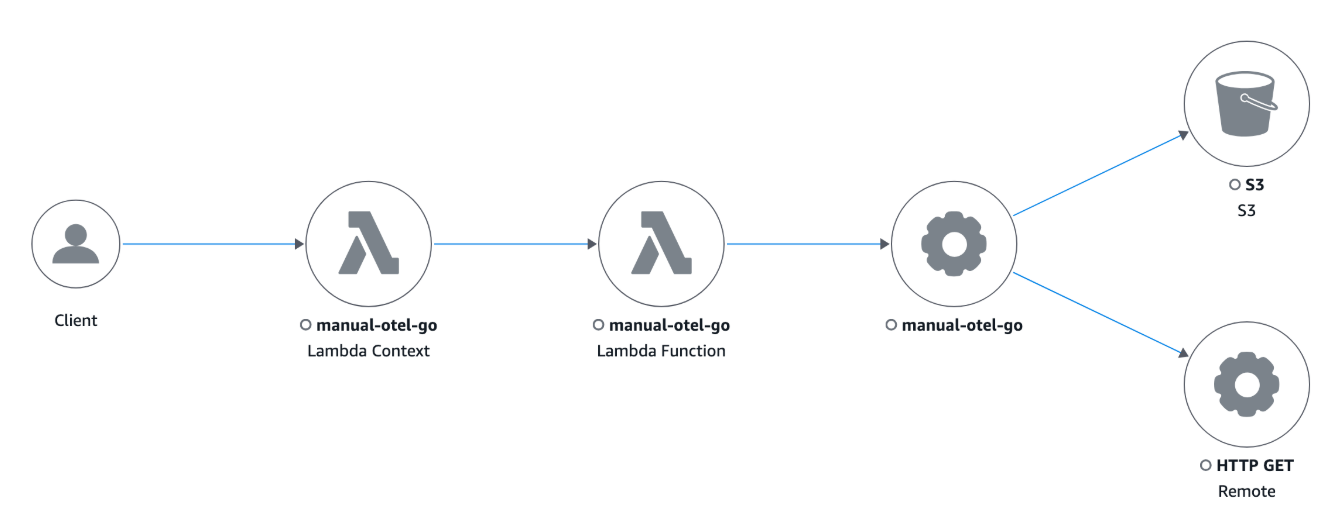
Al invocar Lambda, verá la siguiente traza en Trace Map CloudWatch la consola: