Version catalog for AWS Health
Learn about the version catalog for AWS Health, which provides a service-wide view of supported versions and their timelines.
Topics
What is the version catalog?
If you run applications on AWS, you must stay current with software versions to maintain a strong security and operational posture. AWS Health already sends account-specific and resource-specific Planned lifecycle events for AWS Health well in advance of major version end-of-support milestones. The version catalog adds a service-wide view of supported versions and their timelines. You can use this view to build upgrade schedules and governance controls, and to move to newer supported versions before you receive an account-specific planned lifecycle event.
The version lifecycle API aggregates this information into a single, consistent schema. With one authenticated API call, you can query the support timeline of a specific release of an AWS service component, such as an AWS Lambda language runtime, an Amazon Relational Database Service (Amazon RDS) engine version, or an Amazon Elastic Kubernetes Service (Amazon EKS) Kubernetes version.
Use this data to build upgrade dashboards, alert on versions that approach end of support, and automate compliance checks for the versions that you run. You can also reduce technical debt by moving to newer supported versions before you receive an account-specific planned lifecycle event.
What you can do with the version catalog
The version lifecycle API gives you programmatic access to understand where every AWS service component sits in its support timeline. Common use cases include the following:
-
Vulnerability and compliance management – Identify software running past its end of life that no longer receives security patches (for example, Python 3.9 reached end of life in October 2025), and feed end-of-life data into compliance dashboards for PCI DSS, SOC 2, and FedRAMP audits.
-
Infrastructure and fleet inventory auditing – Cross-reference your configuration management database (CMDB) or resource inventory to flag unsupported database engines (Amazon RDS PostgreSQL, MySQL) or Lambda runtimes (Node.js, Java, .NET). This is especially useful for AWS-managed services, because the catalog tracks Amazon EKS, Amazon Aurora (Aurora) MySQL and PostgreSQL, Amazon RDS, Amazon OpenSearch Service, Amazon ElastiCache, Lambda runtimes, and more.
-
Proactive upgrade planning – Build migration timelines and programs, and generate roadmaps that show when each dependency exits support relative to its active development phases.
-
CI/CD pipeline automation – Integrate the API into your pipelines to fail builds or raise warnings when a project depends on a runtime or framework that is at or near end of life. You can also maintain a test matrix automatically (for example, test against all actively supported Python versions) without hardcoding version lists.
-
Developer tooling and dashboards – Power internal operational dashboards that show the support status of every component used in a specific workload.
-
AWS service lifecycle tracking – Track AWS-managed service versions, such as Amazon EKS and Lambda, and prepare for forced upgrades before they occur.
How to access the version catalog
You can view the version catalog in two ways:
-
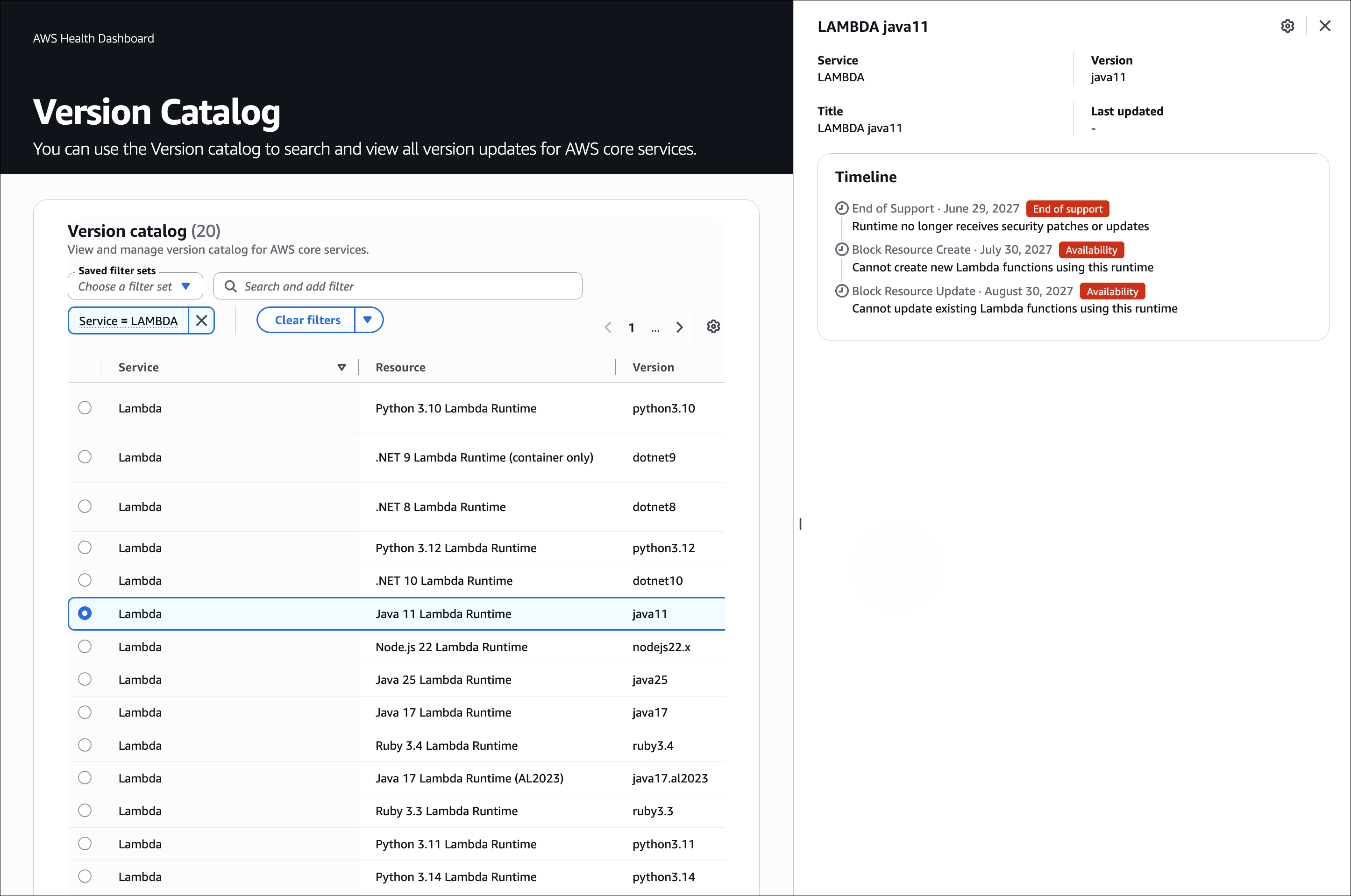
Health Dashboard – View supported versions and their lifecycle timelines directly in the console.
-
AWS Health API – Customers on AWS Support can call the
DescribeServiceLifecycleAPI to integrate lifecycle data into their operational workflows.
See the AWS Health API Reference for full details.
Details available in the version catalog
Each version in a response provides an overview and a timeline toward the various phases in the lifecycle.
Top-level version entry
Field |
Description |
|---|---|
|
The AWS service that the version belongs to, for example, |
|
The human-readable name of the version, for example, |
|
The service-specific version identifier that you pass in queries, for example,
|
|
A list of lifecycle events for this version, in chronological order. Each event marks a significant date, such as a release, an end of standard support, or an end of life, and includes impact-risk tags that indicate the consequence of that date passing. Read the events in order to understand the full timeline from release through end of support. |
Lifecycle event object
Field |
Description |
|---|---|
|
The milestone type, for example, |
|
The date when the milestone takes effect. |
|
A human-readable explanation of what happens on this date. |
|
One or more impact-risk tags, such as |
|
The Regions that the event applies to. A value of |
Note
The values shown for lifecycleEventType and impactRisks are
those visible in this example. See the AWS Health API Reference for the complete list of possible values.
Impact-risk tags
Each event lists one or more impact-risk tags so that you can assess severity.
AVAILABILITY impacts are the most urgent, because the resource becomes unavailable
after that date passes.
Tag |
Meaning |
|---|---|
|
The version no longer receives security patches or updates. |
|
Continuing to run this version might incur additional charges, for example, extended-support fees. |
|
The resource becomes unavailable after the date passes. This is the most urgent impact. |
How to retrieve the version catalog information with the API
Query the lifecycle information by using the AWS Command Line Interface (AWS CLI).
aws health describe-service-lifecycle
The following example shows a version entry from the DescribeServiceLifecycle
API.
{
  "service": "LAMBDA",
  "title": "Python 3.14 Lambda Runtime",
  "version": "python3.14",
  "lifecycleEvents": [
    {
      "lifecycleEventType": "END_OF_SUPPORT",
      "date": 1877472000.0,
      "description": "Runtime no longer receives security patches or updates",
      "impactRisks": ["END_OF_SUPPORT"],
      "regions": ["all"]
    },
    {
      "lifecycleEventType": "BLOCK_RESOURCE_CREATE",
      "date": 1880150400.0,
      "description": "Cannot create new Lambda functions using this runtime",
      "impactRisks": ["AVAILABILITY"],
      "regions": ["all"]
    },
    {
      "lifecycleEventType": "BLOCK_RESOURCE_UPDATE",
      "date": 1882828800.0,
      "description": "Cannot update existing Lambda functions using this runtime",
      "impactRisks": ["AVAILABILITY"],
      "regions": ["all"]
    }
  ]
}
How to view the version catalog in the Health Dashboard
The following shows the version catalog feature in the Health Dashboard.