Configuring Amazon Q Developer in chat applications to send notifications about events in AWS Health
You can receive AWS Health events directly in your chat clients, such as Slack and Amazon Chime.
You can use this event to identify recent AWS service issues that might affect your AWS
applications and infrastructure. Then, you can sign in to your AWS Health DashboardAWS_EC2_INSTANCE_STOP_SCHEDULED event type in your AWS account, the
AWS Health event can appear directly to your Slack channel.
Prerequisites
Before you get started, you must have the following:
-
A chat client configured with Amazon Q Developer in chat applications. You can configure Amazon Chime and Slack. For more information, see Getting started with Amazon Q Developer in chat applications in the Amazon Q Developer in chat applications Administrator Guide.
-
An Amazon SNS topic that you created and to which you're subscribed. If you already have an SNS topic, you can use an existing one. For more information, see Getting started with Amazon SNS in the Amazon Simple Notification Service Developer Guide.
To receive AWS Health events with Amazon Q Developer in chat applications
-
Follow the instructions to set up a rule in Amazon EventBridge to capture AWS Health events outlined in Creating rules using the Enhanced Builder and Creating rules using the Advanced Builder in the Amazon EventBridge User Guide. For more information, see Configuring an EventBridge rule to send notifications about events in AWS Health.
-
When you finish setting up the event pattern, add a comma to the last line of the pattern, and add the following line to remove unnecessary chat messages from paginated AWS Health events. See Viewing paginated lists of AWS Health events on EventBridge.
"detail.page": ["1"] -
When you choose the target, choose an SNS topic. You use the same SNS topic in the Amazon Q Developer in chat applications console.
-
Complete the rest of the procedure to create the rule.
-
-
Navigate to the Amazon Q Developer in chat applications console
. -
Choose your chat client, such as your Slack channel name, and then choose Edit.
-
In the Notifications - optional section, for Topics, choose the same SNS topic that you specified in step 1.
-
Choose Save.
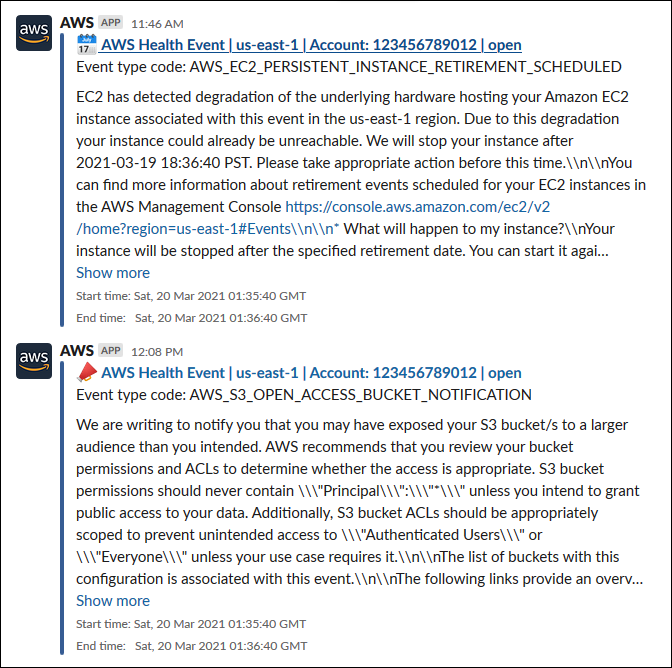
When AWS Health sends an event to EventBridge that matches your rule, the AWS Health event will appear in your chat client.
-
Choose the event name to see more information in your AWS Health Dashboard.
Example: AWS Health events sent to Slack
The following is an example of two AWS Health events for Amazon EC2 and Amazon Simple Storage Service (Amazon S3) in the US East (N. Virginia) Region that appear in the Slack channel.