Configure logging for .NET applications in Amazon CloudWatch Logs by using NLog
Bibhuti Sahu and Rob Hill (AWS), Amazon Web Services
Summary
This pattern describes how to use the NLog open-source logging framework to log .NET application usage and events in Amazon CloudWatch Logs
To write log messages to CloudWatch Logs, you add the AWS.Logger.NLog NuGet package to the .NET project. Then, you update the NLog.config file to use CloudWatch Logs as a target.
Prerequisites and limitations
Prerequisites
An active AWS account.
A .NET web or console application that:
Uses supported .NET Framework or .NET Core versions. For more information, see Product versions.
Uses NLog to send log data to Application Insights.
Permissions to create an IAM role for an AWS service. For more information, see Service role permissions
. Permissions to pass a role to an AWS service. For more information, see Granting a user permissions to pass a role to an AWS service
.
Product versions
.NET Framework version 3.5 or later
.NET Core versions 1.0.1, 2.0.0, or later
Architecture
Target technology stack
NLog
Amazon CloudWatch Logs
Target architecture
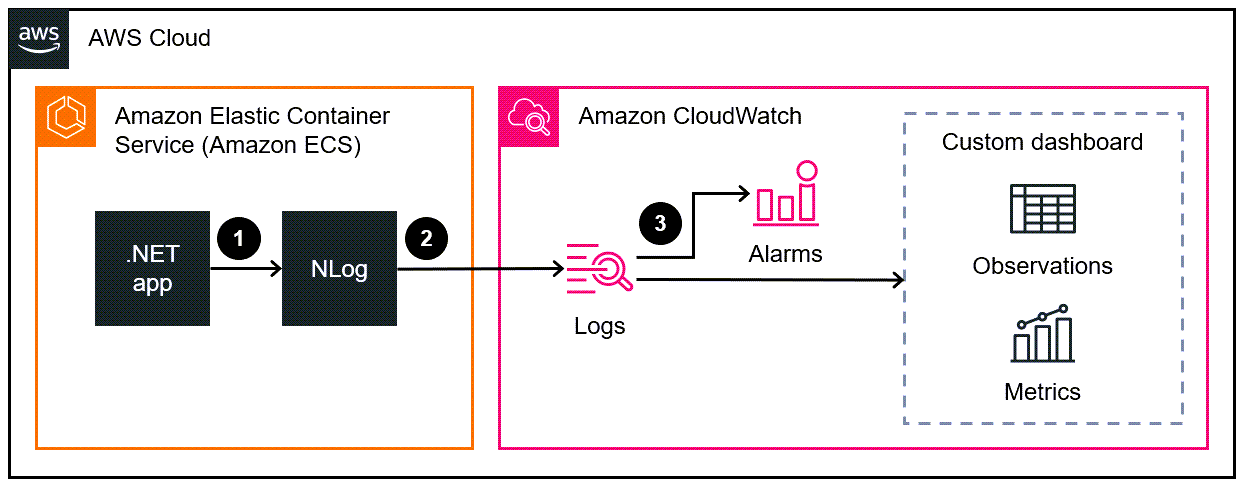
The .NET application writes log data to the NLog logging framework.
NLog writes the log data to CloudWatch Logs.
You use CloudWatch alarms and custom dashboards to monitor the .NET application.
Tools
AWS services
Amazon CloudWatch Application Insights
helps you observe the health of your applications and underlying AWS resources. Amazon CloudWatch Logs
helps you centralize the logs from all your systems, applications, and AWS services so you can monitor them and archive them securely. AWS Identity and Access Management (IAM)
helps you securely manage access to your AWS resources by controlling who is authenticated and authorized to use them. AWS Tools for PowerShell
are a set of PowerShell modules that help you script operations on your AWS resources from the PowerShell command line.
Other tools
Logger.NLog
is an NLog target that records log data to CloudWatch Logs. NLog
is an open-source logging framework for .NET platforms that helps you write log data to targets, such as databases, log files, or consoles. PowerShell
is a Microsoft automation and configuration management program that runs on Windows, Linux, and macOS. Visual Studio
is an integrated development environment (IDE) that includes compilers, code completion tools, graphical designers, and other features that support software development.
Best practices
Set a retention policy
for the target log group. This must be done outside of the NLog configuration. By default, log data is stored in CloudWatch Logs indefinitely. Adhere to the Best practices for managing AWS access keys
.
Epics
| Task | Description | Skills required |
|---|---|---|
Create an IAM policy. | Follow the instructions in Creating policies using the JSON editor
| AWS administrator, AWS DevOps |
Create an IAM role. | Follow the instructions in Creating a role to delegate permissions to an AWS service | AWS administrator, AWS DevOps |
Set up AWS Tools for PowerShell. |
| General AWS |
| Task | Description | Skills required |
|---|---|---|
Install the NuGet package. |
| App developer |
Configure the logging target. |
For a sample configuration file, see the Additional information section of this pattern. When you run your application, NLog will write the log messages and send them to CloudWatch Logs. | App developer |
| Task | Description | Skills required |
|---|---|---|
Validate logging. | Follow the instructions in View log data sent to CloudWatch Logs | General AWS |
Monitor the .NET application stack. | Configure monitoring in CloudWatch as needed for your use case. You can use CloudWatch Logs Insights | General AWS |
Troubleshooting
| Issue | Solution |
|---|---|
Log data doesn’t appear in CloudWatch Logs. | Make sure that the IAM policy is attached to the IAM role that CloudWatch Logs assumes. For instructions, see the Set up access and tools section in the Epics section. |
Related resources
Working with log groups and log streams
(CloudWatch Logs documentation) Amazon CloudWatch Logs and .NET Logging Frameworks
(AWS blog post)
Additional information
The following is a sample NLog.config file.
<?xml version="1.0" encoding="utf-8" ?>
<configuration>
  <configSections>
    <section name="nlog" type="NLog.Config.ConfigSectionHandler, NLog" />
  </configSections>
  <startup>
    <supportedRuntime version="v4.0" sku=".NETFramework,Version=v4.7.2" />
  </startup>
  <nlog>
    <extensions>
      <add assembly="NLog.AWS.Logger" />
    </extensions>
    <targets>
      <target name="aws" type="AWSTarget" logGroup="NLog.TestGroup" region="us-east-1" profile="demo"/>
    </targets>
    <rules>
      <logger name="*" minlevel="Info" writeTo="aws" />
    </rules>
  </nlog>
</configuration>