Enabling Amazon S3 Tables integration
You can create Amazon S3 table buckets using Amazon S3 console, and integrate it with AWS analytics services. For more information, see Using Amazon S3 Tables with AWS analytics services.
In AWS Lake Formation, you can enable Amazon S3 Tables integration with AWS Glue Data Catalog and AWS Lake Formation using the Lake Formation console or use AWS CLI.
-
Open the Lake Formation console at https://eusc-de-east-1.console.amazonaws-eusc.eu/lakeformation/
. In the navigation pane, choose Catalogs under Data Catalog.
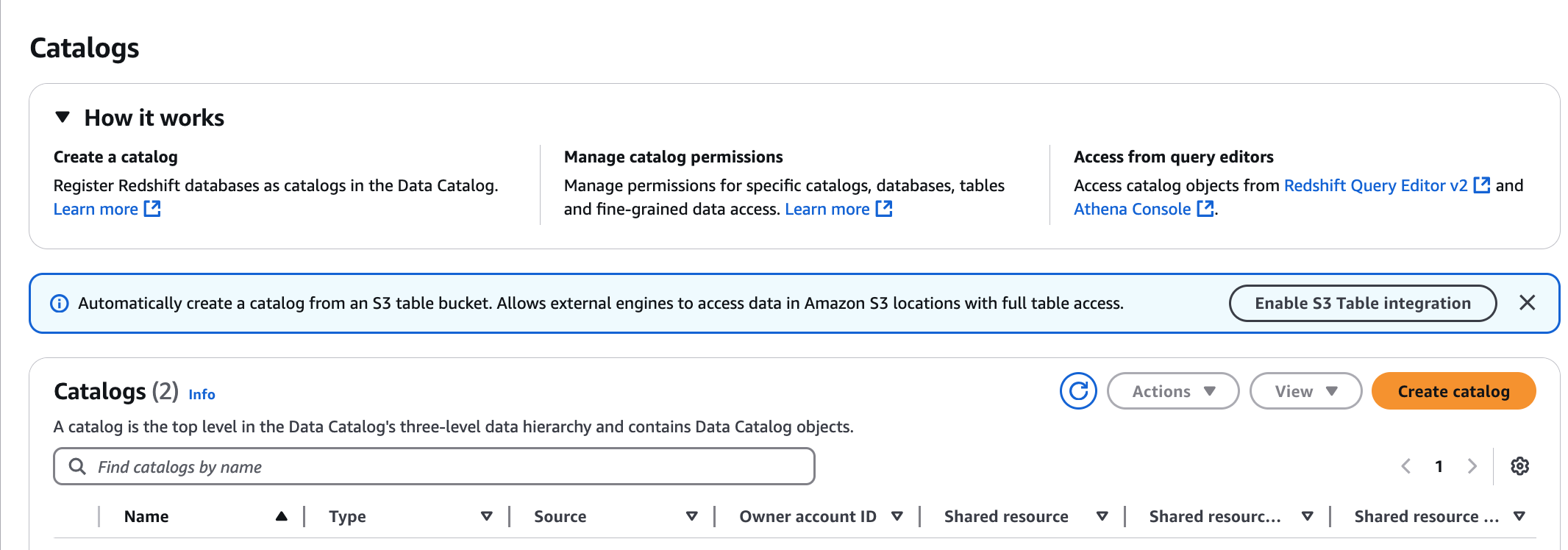
Choose Enable S3 Table integration on the Catalogs page.
-
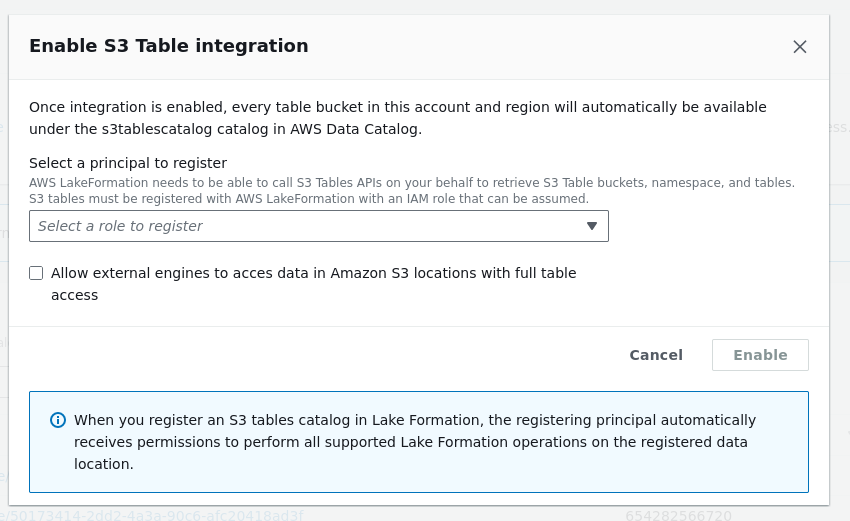
Choose an IAM role with the required permissions for Lake Formation to assume to vend credentials to the analytical query engines. For the permissions required for the role to accessing data, see step3-permissions in the prerequisites section.
-
Select Allow external engines to access data in Amazon S3 locations with full table access option. When you enable full table access for third-party engines, Lake Formation returns credentials to the third-party engine directly without performing IAM session tag validation. This means you cannot apply Lake Formation fine-grained access controls to the tables being accessed.
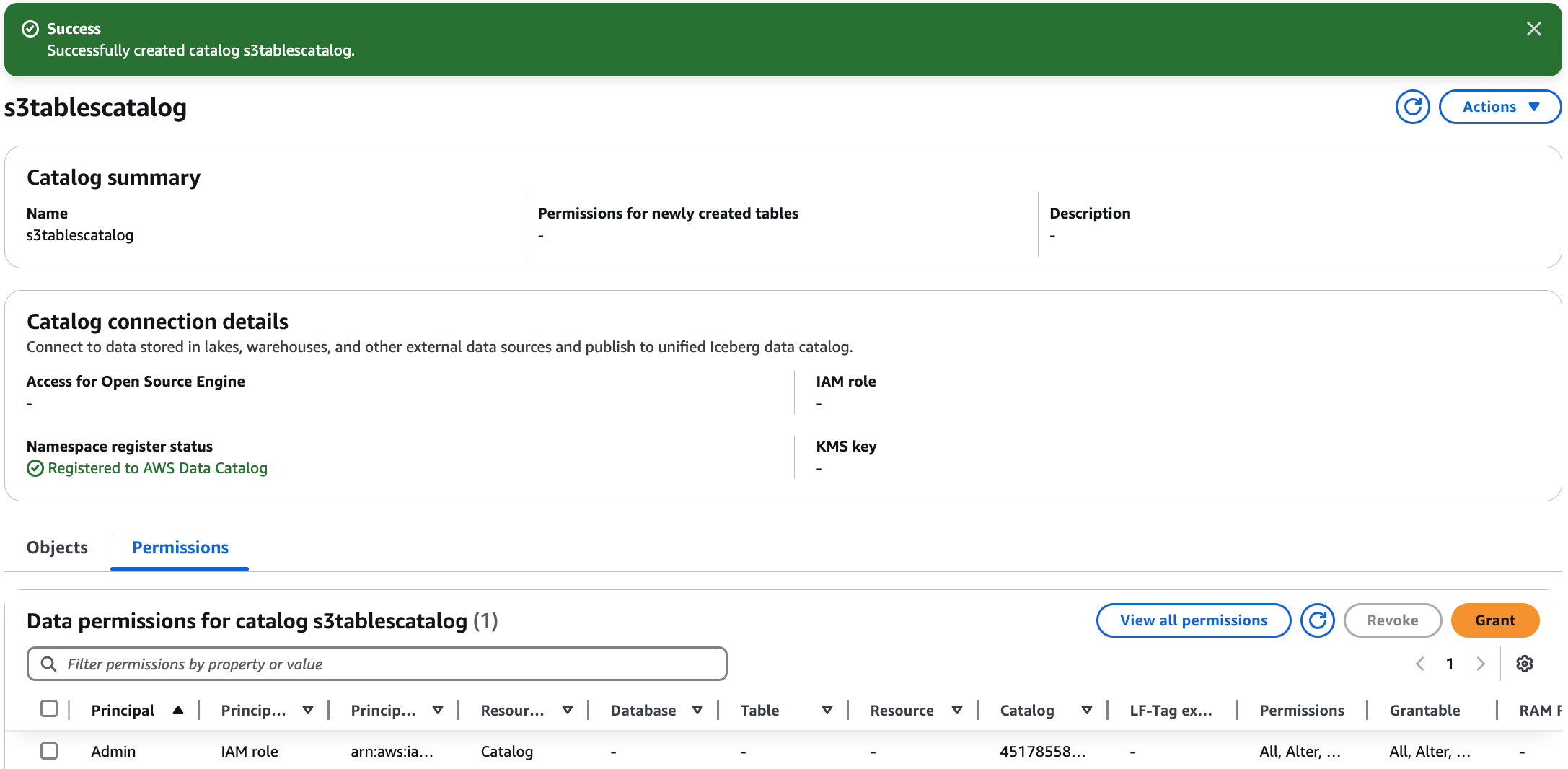
Choose Enable. The new catalog for S3 Tables is added to the catalog list. When you enable the S3 tables catalog integration, the service registers the data location of the S3 table bucket with Lake Formation.
-
Choose the catalog to view catalog objects and grant permissions to other principals.
To create multi-level catalogs, see the Creating a table bucket section in the Amazon Simple Storage Service User Guide.
Following the prerequisites section, create an IAM service role that allows Lake Formation to access your table resources.
-
Create a file called
Role-Trust-Policy.jsonthat contains the following trust policy:{ "Version": "2012-10-17", "Statement": [ { "Sid": "LakeFormationDataAccessPolicy", "Effect": "Allow", "Principal": { "Service": "lakeformation.amazonaws.com" }, "Action": [ "sts:AssumeRole", "sts:SetContext", "sts:SetSourceIdentity" ], "Condition": { "StringEquals": { "aws:SourceAccount": "111122223333" } } } ] } -
Create the IAM service role by using the following command:
aws iam create-role \ --role-nameS3TablesRoleForLakeFormation\ --assume-role-policy-document file://Role-Trust-Policy.json -
Create a file called
LF-GluePolicy.jsonthat contains the following policy:{ "Version": "2012-10-17", "Statement": [ { "Sid": "LakeFormationPermissionsForS3ListTableBucket", "Effect": "Allow", "Action": [ "s3tables:ListTableBuckets" ], "Resource": [ "*" ] }, { "Sid": "LakeFormationDataAccessPermissionsForS3TableBucket", "Effect": "Allow", "Action": [ "s3tables:CreateTableBucket", "s3tables:GetTableBucket", "s3tables:CreateNamespace", "s3tables:GetNamespace", "s3tables:ListNamespaces", "s3tables:DeleteNamespace", "s3tables:DeleteTableBucket", "s3tables:CreateTable", "s3tables:DeleteTable", "s3tables:GetTable", "s3tables:ListTables", "s3tables:RenameTable", "s3tables:UpdateTableMetadataLocation", "s3tables:GetTableMetadataLocation", "s3tables:GetTableData", "s3tables:PutTableData" ], "Resource": [ "arn:aws:s3tables:us-east-1:111122223333:bucket/*" ] } ] } -
Attach the policy to the role by using the following command:
aws iam put-role-policy \ --role-nameS3TablesRoleForLakeFormation\ --policy-nameLakeFormationDataAccessPermissionsForS3TableBucket\ --policy-document file://LF-GluePolicy.json -
Create a file called
input.jsonthat contains the following:{ "ResourceArn": "arn:aws:s3tables:us-east-1:111122223333:bucket/*", "WithFederation": true, "RoleArn": "arn:aws:iam::111122223333:role/S3TablesRoleForLakeFormation" } -
Register table buckets with Lake Formation by using the following command:
aws lakeformation register-resource \ --region us-east-1 \ --with-privileged-access \ --cli-input-json file://input.json -
Create a file called
catalog.jsonthat contains the following catalog:{ "Name": "s3tablescatalog", "CatalogInput": { "FederatedCatalog": { "Identifier": "arn:aws:s3tables:us-east-1:111122223333:bucket/*", "ConnectionName": "aws:s3tables" }, "CreateDatabaseDefaultPermissions": [], "CreateTableDefaultPermissions": [], "AllowFullTableExternalDataAccess": "True" } } -
Create the
s3tablescatalogcatalog by using the following command. Creating this catalog populates the AWS Glue Data Catalog with objects corresponding to table buckets, namespaces, and tables.aws glue create-catalog \ --region us-east-1 \ --cli-input-json file://catalog.json -
Verify that the
s3tablescatalogcatalog was added in AWS Glue by using the following command:aws glue get-catalog --catalog-id s3tablescatalog