AWSSupport-TroubleshootMWAAEnvironmentCreation
Description
The AWSSupport-TroubleshootMWAAEnvironmentCreation runbook provides
information to debug Amazon Managed Workflows for Apache Airflow (Amazon MWAA) environment creation issues, and perform checks
along with the documented reasons on a best effort basis to help identify the failure.
How does it work?
The runbook performs the following steps:
Retrieves the details of the Amazon MWAA environment.
Checks customer managed endpoints if the environment uses customer managed endpoint management.
Verifies the execution role permissions.
Checks if the environment has permissions to use the provided AWS KMS key for logging, and if the required CloudWatch log group exists.
Parses the logs in the provided log group to locate any errors.
Checks the network configuration to verify if the Amazon MWAA environment has access to the required endpoints, including Availability Zone diversity.
Generates a report with the findings.
Document type
Automation
Owner
Amazon
Platforms
/
Required IAM permissions
The AutomationAssumeRole parameter requires the following actions to
use the runbook successfully.
airflow:GetEnvironmentcloudtrail:LookupEventsec2:DescribeNatGatewaysec2:DescribeNetworkAclsec2:DescribeNetworkInterfacesec2:DescribeRouteTablesec2:DescribeSecurityGroupsec2:DescribeSubnetsec2:DescribeTransitGatewayAttachmentsec2:DescribeTransitGatewayVpcAttachmentsec2:DescribeTransitGatewaysec2:DescribeVpcAttributeec2:DescribeVpcEndpointsec2:DescribeVpcPeeringConnectionsec2:DescribeVpcsec2:SearchTransitGatewayRoutesiam:GetPolicyiam:GetPolicyVersioniam:GetRolePolicyiam:ListAttachedRolePoliciesiam:ListRolePoliciesiam:SimulateCustomPolicykms:DescribeKeykms:GetKeyPolicykms:ListAliaseslogs:DescribeLogGroupslogs:FilterLogEventss3:GetBucketAcls3:GetBucketPolicyStatuss3:GetBucketPublicAccessBlocks3:GetAccountPublicAccessBlockssm:GetAutomationExecutionssm:StartAutomationExecutionsts:GetCallerIdentity
Example policy
        {
            "Version": "2012-10-17",
            "Statement": [
                {
                    "Sid": "ReadOnlyPermissions",
                    "Effect": "Allow",
                    "Action": [
                        "airflow:GetEnvironment",
                        "cloudtrail:LookupEvents",
                        "ec2:DescribeNatGateways",
                        "ec2:DescribeNetworkAcls",
                        "ec2:DescribeNetworkInterfaces",
                        "ec2:DescribeRouteTables",
                        "ec2:DescribeSecurityGroups",
                        "ec2:DescribeSubnets",
                        "ec2:DescribeTransitGatewayAttachments",
                        "ec2:DescribeTransitGatewayVpcAttachments",
                        "ec2:DescribeTransitGateways",
                        "ec2:DescribeVpcAttribute",
                        "ec2:DescribeVpcEndpoints",
                        "ec2:DescribeVpcPeeringConnections",
                        "ec2:DescribeVpcs",
                        "ec2:SearchTransitGatewayRoutes",
                        "iam:GetPolicy",
                        "iam:GetPolicyVersion",
                        "iam:GetRolePolicy",
                        "iam:ListAttachedRolePolicies",
                        "iam:ListRolePolicies",
                        "iam:SimulateCustomPolicy",
                        "kms:DescribeKey",
                        "kms:GetKeyPolicy",
                        "kms:ListAliases",
                        "logs:DescribeLogGroups",
                        "logs:FilterLogEvents",
                        "s3:GetBucketAcl",
                        "s3:GetBucketPolicyStatus",
                        "s3:GetBucketPublicAccessBlock",
                        "s3:GetAccountPublicAccessBlock",
                        "ssm:GetAutomationExecution",
                        "sts:GetCallerIdentity"
                    ],
                    "Resource": "*"
                },
                {
                    "Sid": "SSMStartConnectivityTroubleshooter",
                    "Effect": "Allow",
                    "Action": [
                        "ssm:StartAutomationExecution"
                    ],
                    "Resource": [
                        "arn:<aws|aws-cn|aws-us-gov>:ssm:*:*:automation-execution/*",
                        "arn:<aws|aws-cn|aws-us-gov>:ssm:*:*:document/AWSSupport-ConnectivityTroubleshooter"
                    ]
                }
            ]
        }
Instructions
Follow these steps to configure the automation:
-
Navigate to AWSSupport-TroubleshootMWAAEnvironmentCreation
in Systems Manager under Documents. -
Choose Execute automation. Make sure your IAM role has the required permissions listed in the preceding section before you run the automation.
-
For the input parameters, enter the following:
-
AutomationAssumeRole (Optional):
The Amazon Resource Name (ARN) of the AWS AWS Identity and Access Management (IAM) role that allows Systems Manager Automation to perform the actions on your behalf. If no role is specified, Systems Manager Automation uses the permissions of the user who starts this runbook.
-
EnvironmentName (Required):
Name of the Amazon MWAA environment that you want to evaluate.
-
LookbackPeriodInHours (Optional):
Specify how far back, in hours, to search CloudTrail events and CloudWatch logs for errors. If you don't specify a value, the automation uses the environment's last update time to determine the lookback window. The default cap is 24 hours. You can specify values above 24, but doing so might result in longer execution times.
-
-
Choose Execute.
-
The automation initiates.
-
The document performs the following steps:
-
GetMWAAEnvironmentDetails:Retrieves the details of the Amazon MWAA environment. If this step fails, the automation process will halt and show as
Failed. -
BranchOnEndpointManagement:Branches the workflow based on whether the Amazon MWAA environment uses customer managed endpoint management. If so, the automation proceeds to check customer managed endpoints.
-
CheckCustomerManagedEndpoints:Verifies the availability and accessibility of customer managed endpoints.
-
CheckIAMPermissionsOnExecutionRole:Verifies that the execution role has the required permissions for Amazon MWAA, Amazon S3, CloudWatch Logs, CloudWatch, and Amazon SQS resources. If it detects a customer managed AWS Key Management Service (AWS KMS) key, the automation validates the key's required permissions. This step employs the
iam:SimulateCustomPolicyAPI to ascertain if the automation execution role meets all required permissions. -
CheckKMSPolicyOnKMSKey:Checks if the AWS KMS key policy allows the Amazon MWAA environment to use the key for encrypting CloudWatch Logs. If the AWS KMS key is AWS-managed, the automation skips this check.
-
CheckIfRequiredLogGroupsExists:Checks if the required CloudWatch log groups for the Amazon MWAA environment exist. If not, the automation checks CloudTrail for
CreateLogGroupandDeleteLogGroupevents. This step also checks forCreateLogGroupevents. -
BranchOnLogGroupsFindings:Branches based on the existence of CloudWatch log groups related to the Amazon MWAA environment. If at least one log group exists, the automation parses it to locate errors. If no log groups are present, the automation skips the next step.
-
CheckForErrorsInLogGroups:Parses the CloudWatch log groups to locate errors.
-
GetRequiredEndPointsDetails:Retrieves the service endpoints utilized by the Amazon MWAA environment.
-
CheckNetworkConfiguration:Verifies that the Amazon MWAA environment's network configuration meets the requirements, including checks on security groups, network ACLs, subnets, route table configurations, and Availability Zone diversity.
-
CheckEndpointsConnectivity:Invokes the
AWSSupport-ConnectivityTroubleshooterchild automation to validate the Amazon MWAA's connectivity to the required endpoints. -
CheckS3BlockPublicAccess:Checks whether the Amazon MWAA environment's Amazon S3 bucket has
Block Public
                            Access
enabled and also reviews the account's overall Amazon S3 Block Public Access settings. -
GenerateReport:Gathers information from the automation and prints the result or output of each step.
-
-
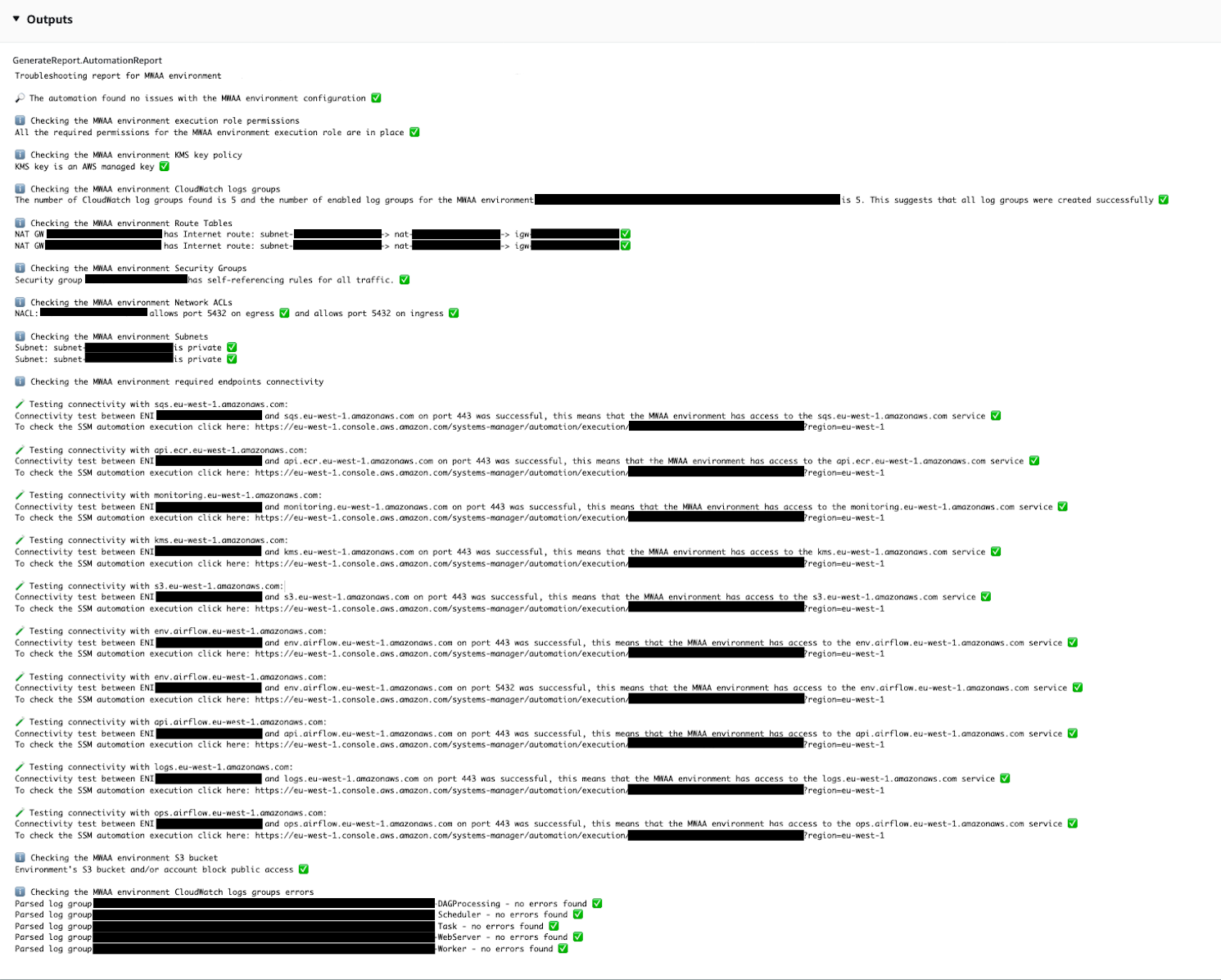
After the automation completes, review the Outputs section for detailed execution results:
-
Checking the Amazon MWAA environment customer managed endpoints:
Verifies the availability and accessibility of customer managed endpoints if the environment uses customer managed endpoint management.
-
Checking the Amazon MWAA environment execution role permissions:
Verifies if the execution role has the required permissions for Amazon MWAA, Amazon S3, CloudWatch Logs, CloudWatch, and Amazon SQS resources. If a Customer Managed AWS KMS key is detected, the automation validates the key's required permissions.
-
Checking the Amazon MWAA environment AWS KMS key policy:
Verifies whether the execution role possesses the necessary permissions for Amazon MWAA, Amazon S3, CloudWatch Logs, CloudWatch, and Amazon SQS resources. Additionally, if a Customer Managed AWS KMS key is detected, the automation checks for the key's required permissions.
-
Checking the Amazon MWAA environment CloudWatch logs groups:
Checks whether the required CloudWatch Log Groups for the Amazon MWAA environment exist. If they do not, the automation then checks CloudTrail to locate
CreateLogGroupandDeleteLogGroupevents. -
Checking the Amazon MWAA environment Route Tables:
Checks whether the Amazon VPC route tables in the Amazon MWAA environment are properly configured.
-
Checking the Amazon MWAA environment Security Groups:
Checks if the Amazon MWAA environment Amazon VPC security groups are properly configured.
-
Checking the Amazon MWAA environment Network ACLs:
Checks whether the Amazon VPC security groups in the Amazon MWAA environment are properly configured.
-
Checking the Amazon MWAA environment Subnets:
Verifies whether the Amazon MWAA environment's subnets are private.
-
Checking the Amazon MWAA environment Availability Zone diversity:
Verifies whether the Amazon MWAA environment's subnets are in different Availability Zones for high availability.
-
Checking the Amazon MWAA environment required endpoints connectivity:
Verifies whether the Amazon MWAA environment can access the required endpoints. For this purpose, the automation invokes the
AWSSupport-ConnectivityTroubleshooterautomation. -
Checking the Amazon MWAA environment Amazon S3 bucket:
Checks whether the Amazon MWAA environment's Amazon S3 bucket has
Block Public
                            Access
enabled and also reviews the account's Amazon S3 Block Public Access settings. -
Checking the Amazon MWAA environment CloudWatch logs groups errors:
Parses the existing CloudWatch log groups of the Amazon MWAA environment to locate errors.
-
References
Systems Manager Automation