Resource gateways in VPC Lattice
A resource gateway is the point that receives traffic into the VPC where a resource resides. It spans multiple Availability Zones.
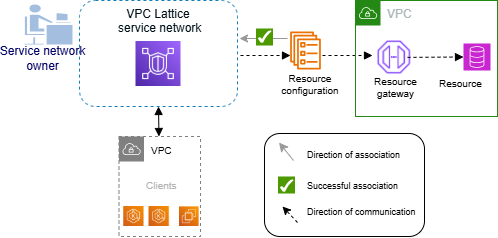
A VPC must have a resource gateway if you plan on making resources inside the VPC accessible from other VPCs or accounts. Every resource you share is associated with a resource gateway. When clients in other VPCs or accounts access a resource in your VPC, the resource sees traffic coming locally from the resource gateway in that VPC. The source IP address of the traffic is the IP address of the resource gateway in an Availability Zone. Multiple resource configurations, each having multiple resources, can be attached to a resource gateway.
The following diagram shows how a client accesses a resource through the resource gateway:
Contents
Considerations
The following considerations apply to resource gateways:
For your resource to be accessible from all Availability Zones
, you should create your resource gateways to span as many Availability Zones as possible. At least one Availability Zone of the VPC endpoint and the resource gateway must overlap.
By default, a VPC can have up to 500 resource gateways. This quota is adjustable. For more information, see Quotas for VPC Lattice.
VPC Lattice might add new ENIs to your resource gateway.
Resource gateways with shared VPC subnets:
The VPC owner, or a participant account that a subnet is shared with, can create a resource gateway in a shared VPC subnet.
A participant account must specify at least one security group when it creates a resource gateway. Every security group that the participant account specifies must be owned by that participant account. The participant account can't use the VPC's default security group or security groups that are shared with it. These security groups return a "cannot be found" error.
The following restrictions apply to the targets of a resource configuration for a resource gateway that a participant account creates:
IP address and CIDR targets must be within the subnets that are shared with the participant account, and each CIDR block must fit within a single subnet. VPC Lattice rejects IP ranges from on-premises networks, peered VPCs, or subnets that are not shared with the participant account.
Resources that other accounts own within those shared subnets can be targets.
A resource configuration that specifies an Amazon RDS database target by ARN must reference a database in the resource gateway owner's account.
To reach a resource outside the shared subnets, such as an Amazon RDS database that the VPC owner owns, use a domain name target. Domain name targets are not subject to the subnet range check, as long as routing allows the connection.
Only the account that owns the resource gateway can create a resource configuration for that resource gateway.
The VPC owner can't view or modify the resource gateways or resource configurations that participant accounts create.
The quota for the maximum number of resource gateways per VPC is enforced at the VPC owner account. This quota counts all resource gateways in the VPC, including those that participant accounts create in the VPC's shared subnets. Only the VPC owner can request an increase to this quota.
Security groups
You can attach security groups to a resource gateway. Security group rules for resource gateways control outbound traffic from the resource gateway to resources.
Recommended outbound rules for traffic flowing from a resource gateway to a database resource
For traffic to flow from a resource gateway to a resource, you must create outbound rules for the resource's accepted listener protocols and port ranges.
| Destination | Protocol | Port range | Comment |
|---|---|---|---|
CIDR range for resource |
TCP | 3306 | Allows traffic from resource gateway to databases. |
IP address types
A resource gateway can have IPv4, IPv6, or dual-stack addresses. The IP address type of a resource gateway must be compatible with the subnets of the resource gateway and the IP address type of the resource, as described here:
-
IPv4 – Assign IPv4 addresses to your resource gateway network interfaces. This option is supported only if all selected subnets have IPv4 address ranges, and the resource also has an IPv4 address. When you use this option, you can configure the number of IPv4 addresses per resource gateway ENI.
-
IPv6 – Assign IPv6 addresses to your resource gateway network interfaces. This option is supported only if all selected subnets are IPv6-only subnets, and the resource also has an IPv6 address. When you use this option, IPv6 addresses are assigned automatically and don't need to be managed.
-
Dualstack – Assign both IPv4 and IPv6 addresses to your resource gateway network interfaces. This option is supported only if all selected subnets have both IPv4 and IPv6 address ranges, and the resource either has an IPv4 or IPv6 address. When you use this option, you can configure the number of IPv4 addresses per resource gateway ENI.
The IP address type of the resource gateway is independent of the IP address type of the client or the VPC endpoint through which the resource is accessed.
IPv4 addresses per ENI
If your resource gateway has an IPv4 or a dual-stack IP address type, you can configure the number of IPv4 addresses assigned to each ENI of your resource gateway. When you create a resource gateway, you choose from 1 to 62 IPv4 addresses. Once you set the number of IPv4 addresses, the value can't be changed.
The IPv4 addresses are used for network address translation and determine the maximum number
of concurrent IPv4 connections to a resource. Each IPv4 address can support up to 55,000
simultaneous connections per destination IP. By default, all resource gateways are assigned 16
IPv4 addresses per ENI. If the PortAllocationErrors metric for your resource gateway
increases, consider creating a resource gateway with more IPv4 addresses per ENI. You can't change
this value on an existing resource gateway. For more information, see Resource gateway and resource configuration metrics.
If your resource gateway uses the IPv6 address type, the resource gateway automatically receives a /80 CIDR per ENI. This value can't be changed. The maximum transmission unit (MTU) per connection is 8500 bytes.
Resource Config DNS Resolution
You can specify how a resource gateway performs DNS resolution for resource configurations that are domain-name targets. You can change this setting after you create the resource gateway. For more information, see Update a resource gateway in VPC Lattice. You can choose:
-
PUBLIC (default) - Domain names are resolved using public DNS resolvers.
-
IN_VPC - Domain names are resolved using the DNS server configured in the DHCP option set of the VPC which the resource gateway is in. You should use this if you are using a private DNS server or your domain-name targets are in a Route 53 private hosted zone.
The following table lists the constraints that apply when Domain Name System (DNS) resolution is set to IN_VPC.
| Constraint | Details |
|---|---|
| IPv6-only subnet support | You can't attach an IN_VPC enabled resource gateway to an IPv6-only subnet. |
| ARN resource configurations | You can't attach ARN-defined resource configurations to the resource gateway. |
| DNS transport protocol | DNS queries use UDP only. TCP fallback isn't supported. |
| Maximum DNS payload size | VPC Lattice advertises a maximum DNS payload size of 8,400 bytes. Because TCP fallback isn't supported, DNS resolution fails for responses larger than this size. |
| Recursive DNS resolver | The DNS resolver must be recursive. If a response contains a CNAME record, the response must also contain the records that the CNAME resolves to. |
The constraints in the table also apply when you change an existing resource gateway to IN_VPC. You can't change a resource gateway to IN_VPC if it has ARN resource configurations or uses the IPv6 address type. You can't change a resource gateway to PUBLIC if it has CIDR resource configurations. Before you change the setting, check that your domain-name targets resolve with the new setting. The change applies to all resource configurations on the resource gateway. Associations stay attached, existing connections aren't affected, and consumers don't need to do anything. VPC Lattice applies the new setting asynchronously. After it's applied, new connections use the new DNS resolution setting.
To attach a CIDR resource configuration to a resource gateway, it must have IN_VPC enabled.
Dynamic Host Configuration Protocol (DHCP) option set DNS server changes take 24 hours to propagate to a resource gateway that uses IN_VPC DNS resolution.
Monitor your resource gateway
VPC Lattice publishes Amazon CloudWatch metrics for your resource gateway to the
AWS/VpcLattice namespace, including bytes processed, packets dropped, new and active
flows, and port allocation errors. You can view metrics for the resource gateway overall or per
Availability Zone. For more information, see Resource gateway and resource configuration metrics.