Choosing a service endpoint for your AWS DataSync agent
A service endpoint is how your AWS DataSync agent communicates with the DataSync service. DataSync supports the following types of service endpoints:
-
Public service endpoint – Data is sent over the public internet.
-
Federal Information Processing Standard (FIPS) service endpoint – Data is sent over the public internet by using processes that comply with FIPS.
-
Virtual private cloud (VPC) service endpoint – Data is sent through your VPC instead of over the public internet, increasing the security of your transferred data.
-
FIPS VPC service endpoint – Data is sent through your VPC using processes that comply with FIPS.
You need a service endpoint to activate your agent. When choosing a service endpoint, remember the following:
-
An agent can only use one type of endpoint. If you need to transfer data using different endpoint types, create an agent for each type.
-
How you connect your storage network to AWS determines what service endpoints you can use.
Choosing a public service endpoint
If you use a public service endpoint, all communication between your DataSync agent and the DataSync service occurs over the public internet.
-
Determine the DataSync public service endpoint that you want to use.
Next step: Activating your AWS DataSync agent
Choosing a FIPS service endpoint
DataSync provides some service endpoints that comply with FIPS. For more information, see FIPS endpoints in the AWS General Reference.
-
Determine the DataSync FIPS service endpoint that you want to use.
Next step: Activating your AWS DataSync agent
Choosing a VPC service endpoint
If you use a VPC service endpoint, your data isn't transferred across the public internet. DataSync instead transfers data through a VPC that's based on the Amazon VPC service.
Contents
How DataSync agents work with VPC service endpoints
VPC service endpoints are provided by AWS PrivateLink. These types of endpoints let you privately connect supported AWS services to your VPC. When you use a VPC service endpoint with DataSync, all communication between your DataSync agent and the DataSync service remains in your VPC.
The VPC service endpoint (along with the network interfaces DataSync creates for data transfer traffic) uses private IP addresses that are only accessible from inside your VPC. For more information, see Connecting your network for AWS DataSync transfers.
DataSync limitations with VPCs
VPCs that you use with DataSync must have default tenancy. VPCs with dedicated tenancy aren't supported.
Creating a VPC service endpoint for DataSync
You create a VPC service endpoint for DataSync in a VPC that you manage.
Note
DataSync now supports using a VPC subnet shared through AWS Resource Access Manager (RAM). A shared subnet can be used when creating an agent.
The following diagram shows an example of DataSync using a VPC service endpoint for transferring from an on-premises storage system to an Amazon S3 bucket. The numbered callouts correspond to the steps to create a VPC service endpoint.
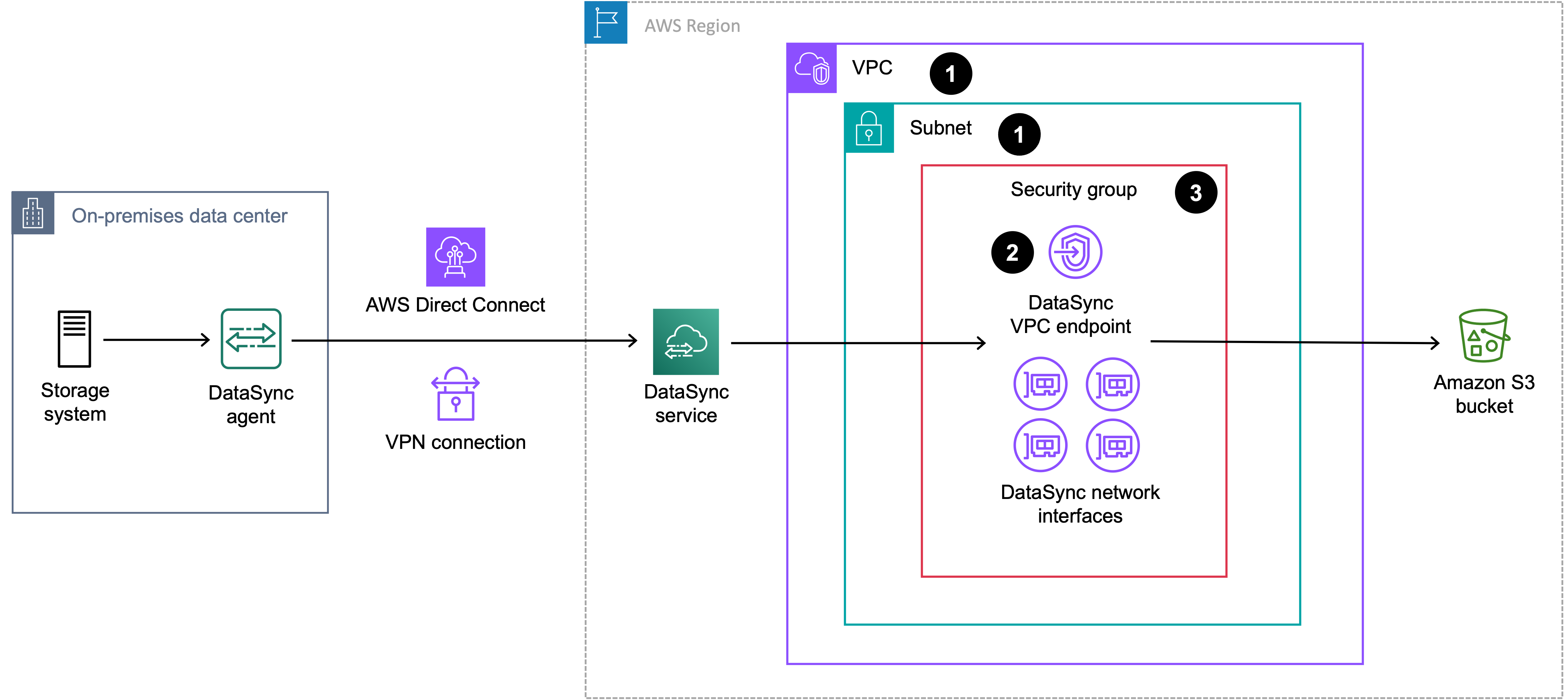
To create a VPC service endpoint for DataSync
-
Create or determine a VPC and subnet where you want to create your VPC service endpoint.
If you're transferring to or from storage that's outside AWS, the VPC should extend to that storage environment (for example, your storage environment might be a data center where your on-premises NFS file server is located). You can do this by using routing rules over Direct Connect or VPN.
-
Create a DataSync VPC service endpoint by doing the following:
-
Open the Amazon VPC console at https://eusc-de-east-1.console.amazonaws-eusc.eu/vpc/
. -
In the left navigation pane, choose Endpoints, then choose Create endpoint.
-
For Service category, choose AWS services.
-
For Services, search for
datasyncand choose the endpoint for the AWS Region that you're in (for example,com.amazonaws.us-east-1.datasyncorcom.amazonaws.us-east-1.datasync-fips). -
For VPC, choose the VPC where you want to create the VPC service endpoint.
-
Expand Additional settings and clear the Enable Private DNS Name check box to disable this setting.
-
For Subnet, choose the subnet where you want to create the VPC service endpoint.
The subnet where you create the VPC service endpoint doesn't need to be the subnet that you specify when creating an agent. For more information, see Using a single VPC service endpoint across multiple subnets.
-
Choose Create endpoint. Take note of the endpoint ID (you need this when activating your agent).
-
-
In your VPC, configure a security group that allows the traffic required for using DataSync VPC service endpoints. Take note of the security group ARN (you need this when activating your agent).
The security group must allow your agent to connect with the private IP addresses of the VPC service endpoint and your network interfaces (which get created when you create your task).
Next step: Activating your AWS DataSync agent
Using a single VPC service endpoint across multiple subnets
You don't need a separate DataSync VPC service endpoint for every subnet that you use with DataSync. A single VPC service endpoint can serve agents across multiple subnets.
This works because the subnet that you specify when creating an agent and the subnet that contains your VPC service endpoint serve two different purposes:
-
The subnet that you specify when creating an agent determines where DataSync creates the network interfaces that handle data transfer traffic for your tasks.
-
The subnet that contains your VPC service endpoint determines the private IP addresses that your agent uses to communicate with the DataSync service. You provide one of these IP addresses as
privateLinkEndpointwhen you get an activation key.
Note
The subnet that you specify when creating an agent is where DataSync creates network interfaces when your AWS storage location is Amazon S3. For other AWS storage locations, DataSync creates the network interfaces in the same subnet as your file system. For more information, see Network interfaces for AWS DataSync transfers.
Neither subnet has to be the subnet where you deployed your agent VM or Amazon EC2 instance.
Note
When you create an agent, the VPC service endpoint ID that you specify is recorded
for informational purposes only. Your agent communicates through the private IP
address that you provide as privateLinkEndpoint when you get an activation key. If you use several VPC
service endpoints in the same VPC, make sure that this IP address belongs to the
endpoint that you intend the agent to use.
When using a single VPC service endpoint across multiple subnets, keep the following in mind:
-
The VPC service endpoint can be in a different VPC from the subnet that you specify when creating an agent.
-
Your security group must allow traffic between your agent and the private IP addresses of the VPC service endpoint. It must also allow traffic between your agent and the network interfaces that DataSync creates in the subnet that you specify when creating an agent.
-
Your agent must be able to reach the private IP addresses of the VPC service endpoint. By default, a VPC service endpoint is routable from any subnet in the same VPC.