What is Amazon SageMaker?
Bringing together widely adopted artificial intelligence (AI)
Guide to SageMaker
The next generation of Amazon SageMaker was
announced at re:Invent 2024
Note
The original Amazon SageMaker has been renamed SageMaker AI
The next generation of Amazon SageMaker consists of two primary components:
-
Amazon SageMaker Unified Studio, which provides an integrated experience to use all your data and tools for analytics and AI
-
Data and AI governance, which applies enterprise-level security and data management with built-in governance throughout the entire data and AI lifecycle
Additionally, SageMaker is built upon an open lakehouse architecture that unifies access to all your data across
Amazon Simple Storage Service (Amazon S3
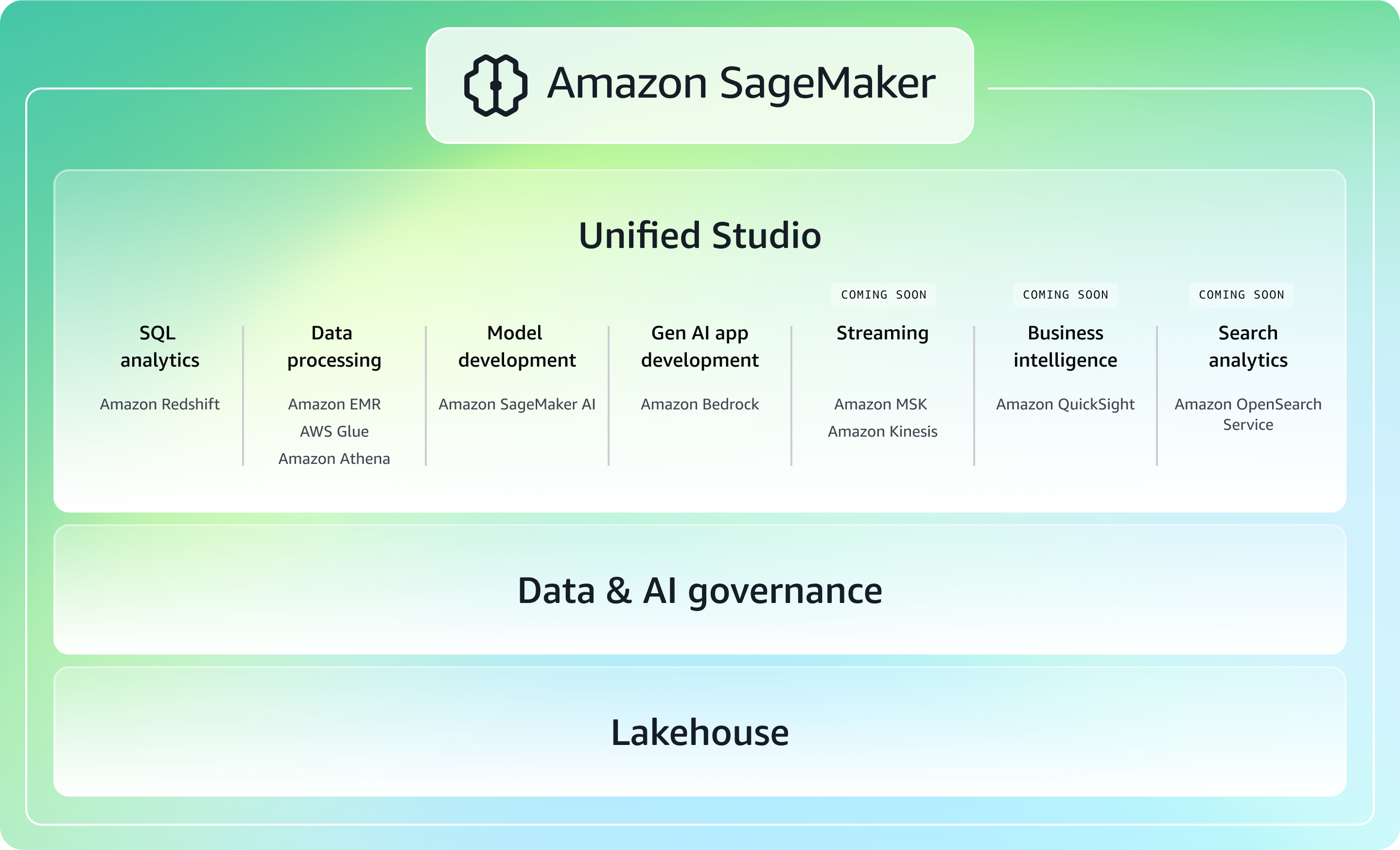
Unified Studio
Amazon SageMaker Unified Studio
is a single data and AI development environment
that brings together functionality and tools that AWS offers in Amazon EMR
Data & AI governance
The next generation of Amazon SageMaker simplifies the discovery, governance, and collaboration
for data and AI. With
Amazon SageMaker Catalog
Lakehouse architecture
The next generation of Amazon SageMaker is built on an
open lakehouse architecture
Capabilities of Amazon SageMaker Unified Studio
The next generation of Amazon SageMaker and its unified studio provide an integrated
experience to use all your data and tools for analytics and AI. Discover your data and put it
to work using familiar AWS tools for model development, generative AI, data processing, and
SQL analytics
Some common capabilities of Amazon SageMaker Unified Studio include the following:
SQL analytics
Leverage SageMaker's SQL analytic capabilities across all of your unified data
through Amazon SageMaker's lakehouse architecture. Users have the
flexibility to use Athena
or Redshift query engines
Data processing
Prepare, orchestrate, and process your data with capabilities in SageMaker,
allowing you to run Apache Spark, Trino, and other open-source analytics
frameworks in a unified data and AI development environment.
Process your data
Data integration
You can use data integration capabilities in Amazon SageMaker to connect to and act on all your data. With AWS data integration capabilities, you can bring together data from multiple sources, operationalize it, and manage to deliver high quality data to your lakehouse architecture, across your data lakes and data warehouses.
Note
What data sources am I able to integrate with Amazon SageMaker?
You are able to unify all your data across Amazon Redshift data warehouses and Amazon S3 data lakes, including S3 Tables,
with SageMaker's lakehouse architecture. Bring your
operational databases and 3rd party application data like Salesforce and SAP to the lakehouse
in near real time through
zero-ETL integrations
Machine learning and model development
Amazon SageMaker AI
Note
When should I use
SageMaker Unified Studio
Currently, SageMaker Unified Studio should be used when you are looking to unify and share your data as a single integrated experience across analytics, ML, and gen AI workloads. You are able to eliminate data silos with an open lakehouse architecture to unify access to data lakes, data warehouses, third-party or federated data sources, and meet all enterprise security needs with built-in data and AI governance.
If you want to solely focus on the purpose-built tools to perform all machine learning (ML)
development steps, from preparing data to building, training, deploying, and managing your
ML and gen AI models, SageMaker Studio remains a great choice. Additionally, use
SageMaker Studio when there are requirements for
RStudio
Generative AI application development
Access Amazon Bedrock's capabilities through SageMaker Unified Studio
Note
When should I use Bedrock in SageMaker Unified Studio versus the
standalone Amazon Bedrock service
Amazon Bedrock's capabilities in Amazon SageMaker Unified Studio are ideal for enterprise teams who need a governed low-code/no-code environment for collaboratively building and deploying generative AI applications, alongside unified analytics and machine learning capabilities.
Customers can use the standalone Bedrock service from the AWS Management Console or Bedrock API when they want to leverage the full feature set of Bedrock including the latest agents, flow and guardrail enhancements, and the Bedrock SDK.
Get started with Amazon SageMaker
You can view demos of Amazon SageMaker and get started by setting up a domain and project.
View demos of Amazon SageMaker
To see Amazon SageMaker before using it yourself, you can review the following clickthrough demos:
For an end-to-end demo, see the Amazon SageMaker detailed clickthrough experience
. This demo includes SageMaker Lakehouse, Amazon SageMaker Catalog, and more in Amazon SageMaker Unified Studio. For a demo of SageMaker Lakehouse, see Amazon SageMaker: Access data in your lakehouse
. This demo includes SageMaker Lakehouse in Amazon SageMaker Unified Studio, including adding a data source and querying data. For a demo of the Amazon SageMaker Catalog, see Amazon SageMaker: Catalog
. This demo includes Amazon SageMaker Catalog in Amazon SageMaker Unified Studio, including browsing assets and subscribing to an asset. For a demo of generative AI, see Amazon SageMaker: Generative AI playground and Gen AI app development
.
Get started with setting up Amazon SageMaker
To get started using Amazon SageMaker, go to Setting up Amazon SageMaker in this guide to set up a domain and create a project. This domain setup and project creation is a prerequisite for all other tasks in Amazon SageMaker.